This section gives the steps for using the qdmg utility to create a virtual database for direct queries of audit data. The example uses the Demodata database installed with Pervasive PSQL.
If you need instructions to import the schema from your own database, see the section “Managing Schemas” in Chapter 4: “Working with Audit Configurations” of Pervasive AuditMaster User’s Guide.
|
a.
|
|
c.
|
Note the Dictionary Path where the DDFs are located. In this example, it’s C:\<installation directory>\Demodata.
|
|
b.
|
Select Admin Audit Configuration and in the window that appears, find the product name in the list of configurations on the left. The product name is the name you entered when you imported the schema into AuditMaster. In this example, the product name is “Pervasive PSQL Demo,” which was already imported when AuditMaster was installed.
|
|
5
|
Now use qdmg to generate the script based on the following:
|
|
w
|
Audited database DDF path name (default installation location C:\<installation directory>\Demodata)
|
|
9
|
This example uses the database name DemodataV and the directory you created, C:\<installation directory>\DemodataV, as shown here.
|
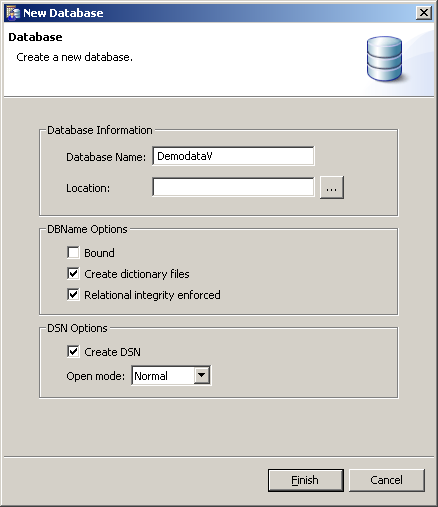
Note You must place the virtual database on the same volume as the AuditMaster installation directory.
|
10
|
Click Finish to complete database creation.
|
|
11
|
|
12
|
In the Open dialog box, navigate to the file script.sql saved earlier in C:\<installation directory>\DemodataV.
|
|
14
|
The columns of an audit record are described in this section. Its structure is representative of the result returned by a query such as SELECT * FROM vstudent.
|
n
|
Audit columns in the result have the prefix AM$ and contain audit data.
|
|
n
|
After the AM$ audit data columns, the rest of the row consists of data fields from the audited table and contain values captured from that table at the time of the audit event.
|
Once you have reviewed the audit record structure, see Running a Query on the Current View File for steps to run a query on the DemodataV example.
|
Login ID under which event occurred. Same as user name under Who tab. See “Displaying Audit Records under Pervasive PSQL Security” in Pervasive AuditMaster User’s Guide.
|
||
|
<Data Column n...>
|