Using AuditMaster Viewer

Using AuditMaster Viewer
A Tour of the Main Window and a Reference List of Tasks
The topics in this chapter include:
n
n
AuditMaster Viewer Concepts
The viewer is a Microsoft Windows client user interface to the Pervasive AuditMaster system. From this main window, you may work with the following features:
n
n
n
n
n
AuditMaster Server
An AuditMaster server is a Pervasive PSQL database server on which the Pervasive AuditMaster event handler and configuration files are installed and running. The event handler monitors the database and logs audit records which can then be queried for display in the AuditMaster Viewer client. Each AuditMaster server is a top branch in the AuditMaster data tree.
Data Tree
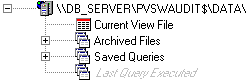
The data tree presents your auditing system in graphical form. Each branch of the tree holds an AuditMaster server and its current view file, archived files, and saved queries. For more information, see AuditMaster Viewer GUI Visual Reference.
View File
Audit records in an AuditMaster event handler log are moved to a view file for query and display. The records reside in the view file until they are moved to an archived file. Each server in the data tree has its own view file and archived files. For more information, see AuditMaster Viewer GUI Visual Reference.
Alerts
An alert is an automated notification that a set of conditions has matched a newly captured audit record. A tripped alert can send email to a selected group of recipients. It also starts an application on the server. See Working with Alerts.
Reports
Reports for viewing on-screen and printing are loaded with queries for selecting audit records. See Printing Reports.
AuditMaster Viewer GUI Visual Reference
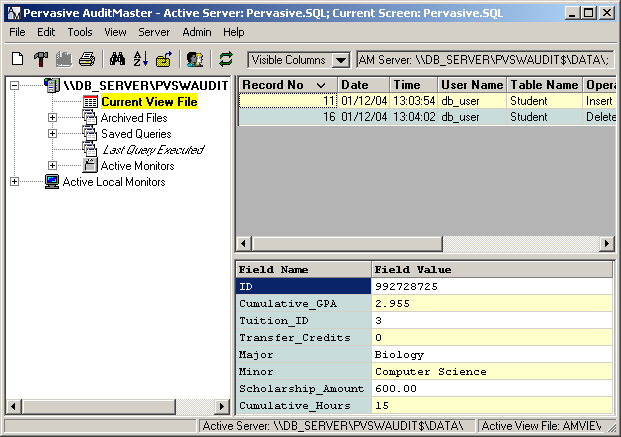
This section provides a reference to main window of the AuditMaster Viewer graphical user interface (GUI). This window displays when the client application first starts. Once you have logged in as a user and run a query to display audit records, the GUI should resemble the following figure. The window includes the following objects:
n
n
n
n
n
n
For details, click any item in the list, or click an area of the image.
Figure 5-1 AuditMaster Viewer main window
Title Bar
This section explains the title bar of the main window.
The title bar lists the name of the application, the active server, and the current screen. In this example, the system being monitored is a Pervasive PSQL database.
Menu and Toolbar
This section describes items in the main window menu and toolbar, shown in the following figure. For details, click an area of the image.
Figure 5-2 Menu and Toolbar
 
Table 5-1
Select Exit to log out and close the viewer
Data Tree
The data tree displays an AuditMaster server. Branches of the tree can be expanded by clicking the plus signs for more detail. You can also right-click tree icons for various command options. Queries may be run against the current view or archived files.
Figure 5-3 Data Tree
Audit Record Grid
When a query is run against the current view or an archived file, the audit record grid shows the result.
Figure 5-4 Audit Record Grid
Audit Record Detail
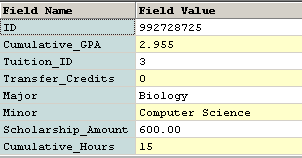
Audit records capture both AuditMaster operations and database activity. For database activity, the audit record detail area in the lower part of the AuditMaster Viewer window shows the fields of the data record where activity occurred.
Figure 5-5 Audit Record Detail
Note Data record detail may be in human language or in hexadecimal, depending on whether the database schema has been imported for AuditMaster to use in displaying data. For more information, see Working with Audit Configurations.

Status Bar
This section explains the text in the status bar at the bottom of the main window.
The status bar displays two messages during AuditMaster Viewer operation:
n
Active Server: \\server_name\PVSWAUDIT$\DATA\
n
Active View File: \AMVIEW.