Data Products
Introduction to Data Products and Data Contracts
A data product is a reusable, active, and standardized data asset designed to deliver measurable value to its users, whether internal or external, by applying the rigorous principles of product thinking and management. It comprises one or more data artifacts (e.g., datasets, models, pipelines) and is enriched with metadata, including governance policies, data quality rules, data contracts, and, where applicable, a software bill of materials (SBOM) to document its dependencies and components. Ownership of a data product is aligned to a specific domain or use case, ensuring accountability, stewardship, and its continuous evolution throughout its lifecycle. Adhering to FAIR principles (findable, accessible, interoperable, and reusable) a data product is designed to be discoverable, scalable, reusable, and aligned with both business and regulatory standards, driving innovation and efficiency in modern data ecosystems.
A data product embeds different types of components, in particular:
- Input ports: An input port is a standardized interface through which a data product receives data from upstream sources. It defines how external data enters the data product. Input ports enable the controlled, traceable ingestion of data, facilitating lineage tracking and quality checks before the data is transformed and served to consumers.
- Output ports: An output port is a standardized interface through which a data product exposes its data to consumers. It defines how the data can be accessed (e.g., via APIs, SQL tables, event streams), along with its format, schema, and protocols. Output ports ensure that data products are interoperable, discoverable, and easy to consume by other teams or systems while enforcing access controls and contracts. A data contract is associated with each output port.
- Internal components: Internal components include datasets and processes that are not supposed to be consumed by end-users and are necessary to produce the output ports. These components are not represented in the current version of the platform.
A data contract is a formal agreement between a data product owner (also known as a producer) and its consumers that defines the structure, meaning, quality expectations, and access terms of the data exposed. It includes a schema definition. It can include data quality rules, Service Level Agreements (SLAs), ownership, rights, and more. In product-oriented data engineering and management, data contracts ensure reliable data consumption, prevent breaking changes, and promote accountability between domains
Data Products in the Actian Data Intelligence Platform
The Actian Data Intelligence Platform supports data products and data contracts natively. It enables organizations to manage, govern, and maximize the value of their data assets as products:
- Define your data products and data contracts with YAML descriptors containing all relevant information for discovery and consumption (name, description, terms and conditions, custom properties, and so on).
- Synchronize data products and their data contracts from your CI/CD pipelines by using our dedicated Data Product API.
- Manage data products and all their components in the Studio to enrich their documentation and publish them into the enterprise marketplace.
- Search, find, and understand data products thanks to the graph-powered search engine and an optimized layout dedicated to the discovery of these new item types.
- Request access to data products directly in Zeenea Explorer and manage these requests in Zeenea Studio to allow an efficient and governed consumption of the data products.
The following are the key benefits of implementing data products in the Actian Data Intelligence Platform:
- Enhance Data Discovery & Accessibility
Data products are supported as native items, allowing for modeling simple as well as more complex data products. Define one or several output ports for each data product to create more use-case-oriented data to better meet business user expectations.
A dedicated and optimized search experience, powered by the knowledge graph, enables users to efficiently search for, discover, understand, and consume data products.
- Governance by Design
By supporting data contracts, our platform encourages organizations in their efforts to shift left metadata management. Design data contracts upfront and integrate them in your CI/CD pipelines to ensure that business expectations from the data contract are met when you deploy new data. Moreover, synchronize your data contracts to keep metadata up to date.
- Scale Data Management and Governance
Coupled with the federated catalog, each domain can design and manage its own data products.
Our platform breaks data silos and supports a data mesh approach by allowing domains publish their data products into the enterprise marketplace.
Create Data Products with the API
The Actian Data Intelligence Platform leverages these standards managed by Bitol (a Linux Foundation project):
These YAML files can be uploaded to the platform through a dedicated REST API.
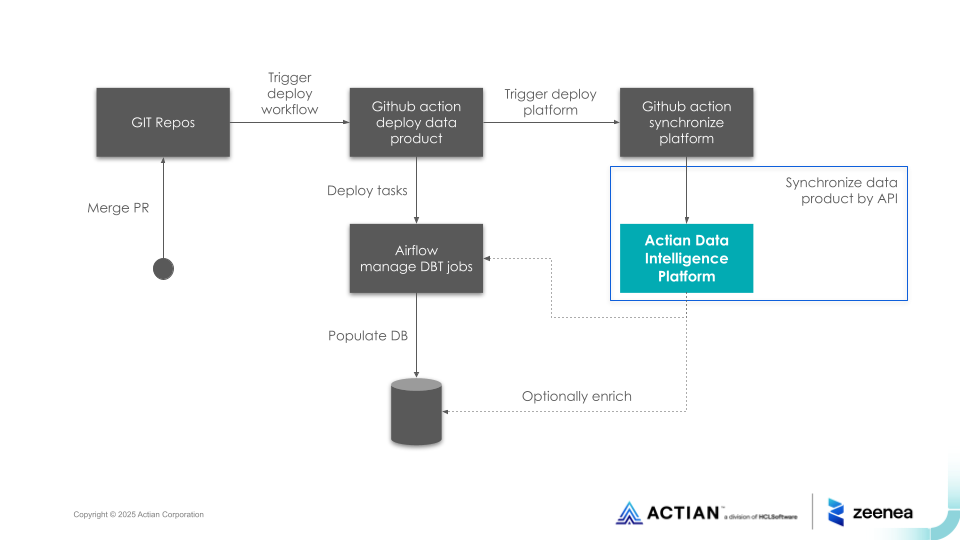
This API can be called from external tools or the CI/CD pipelines, for instance, from a GitHub Action, like in the following diagram:
In the current version, you cannot create data products from the Studio.
The following is a sample YAML file for a data product:
apiVersion: v1.9.0
kind: DataProduct
name: Yet Another Product
id: fbe8d147-28db-4f1d-bedf-a3fe9f458427
description:
purpose: Yet Another Product, with datasets from data contracts.
tags: ['experimental']
inputPorts:
- name: kafka_stock_topic
version: 1.0.0
contractId: dbb7b1eb-7628-436e-8914-2a00638ba6db
outputPorts:
- name: COVID-19
description: "COVID-19"
version: 1.0.0
contractId: f07a9a38-4020-415f-abd1-2802d6e77f19
customProperties:
- property: zeeneaGlossaryRefs
value: "KPI/Number of Delivered Doses of Vaccine"
inputContracts:
- id: dbb7b1eb-7628-436e-8914-2a00638ba6db
version: 2.0.0
kind: DataProduct
name: Yet Another Product
id: fbe8d147-28db-4f1d-bedf-a3fe9f458427
description:
purpose: Yet Another Product, with datasets from data contracts.
tags: ['experimental']
inputPorts:
- name: kafka_stock_topic
version: 1.0.0
contractId: dbb7b1eb-7628-436e-8914-2a00638ba6db
outputPorts:
- name: COVID-19
description: "COVID-19"
version: 1.0.0
contractId: f07a9a38-4020-415f-abd1-2802d6e77f19
customProperties:
- property: zeeneaGlossaryRefs
value: "KPI/Number of Delivered Doses of Vaccine"
inputContracts:
- id: dbb7b1eb-7628-436e-8914-2a00638ba6db
version: 2.0.0
The following is a sample YAML file for a data contract:
kind: DataContract
apiVersion: v3.0.2
version: 1.0.0
id: f07a9a38-4020-415f-abd1-2802d6e77f19
description:
purpose: Johns Hopkins University data on COVID-19 cases, Enigma
customProperties:
- property: zeeneaGlossaryRefs
value: "KPI/Number of Delivered Doses of Vaccine"
tags: ["kafka", "confluent", "aws", "managed"]
schema:
- name: covid_cases
physicalName: covid_cases
description: the number of confirmed covid cases reported for a specified region, with location and county/province/country information.
properties:
- name: fips
logicalType: string
description: state and county two digits code
- name: admin2
logicalType: string
description: county name
- name: province_state
logicalType: string
description: province name or state name
- name: country_region
logicalType: string
description: country name or region name
- name: last_update
logicalType: date
description: last update timestamp
- name: latitude
logicalType: number
description: location (latitude)
- name: longitude
logicalType: number
description: location (longitude)
- name: confirmed
logicalType: int
description: number of confirmed cases
- name: combined_key
logicalType: string
description: county name+state name+country name
apiVersion: v3.0.2
version: 1.0.0
id: f07a9a38-4020-415f-abd1-2802d6e77f19
description:
purpose: Johns Hopkins University data on COVID-19 cases, Enigma
customProperties:
- property: zeeneaGlossaryRefs
value: "KPI/Number of Delivered Doses of Vaccine"
tags: ["kafka", "confluent", "aws", "managed"]
schema:
- name: covid_cases
physicalName: covid_cases
description: the number of confirmed covid cases reported for a specified region, with location and county/province/country information.
properties:
- name: fips
logicalType: string
description: state and county two digits code
- name: admin2
logicalType: string
description: county name
- name: province_state
logicalType: string
description: province name or state name
- name: country_region
logicalType: string
description: country name or region name
- name: last_update
logicalType: date
description: last update timestamp
- name: latitude
logicalType: number
description: location (latitude)
- name: longitude
logicalType: number
description: location (longitude)
- name: confirmed
logicalType: int
description: number of confirmed cases
- name: combined_key
logicalType: string
description: county name+state name+country name
ODPS and ODCS Support Details in Actian Data Intelligence Platform
ODPS Support
The following table shows the level of support the Actian Data Intelligence Platform provides for each section of the ODPS:
Section | Support Level |
|---|---|
Fundamentals | Partially Supported |
Product Information | Partially Supported |
Management Ports | Not Supported |
Support and Communication Channels | Not Supported |
Team | Partially Supported |
Ancillary Objects: Custom Properties | Fully Supported |
Ancillary Objects: Authoritative Definitions | Partially Supported |
Other Properties | Not Supported |
- Fully Supported: All attributes are supported and mapped to Actian concepts.
- Partially Supported: Some attributes are supported, but not the entire list.
- Not Supported: None of the attributes in this section are mapped to Actian concepts.
Note: Unsupported attributes or sections are ignored when the YAML file is ingested by the platform.
The following sections provide detailed attribute-level information for the fully and partially supported sections.
Fundamentals
Key | Required | Supported | Description |
|---|---|---|---|
apiVersion | Yes | Yes | Version of the standard used to build data product. Default value is v1.0.0. The platform ingests ODPS attributes in a best-effort approach based on the v0.9.0. This information is not displayed in the UI. |
kind | Yes | Yes | The kind of file this is. Valid value is DataProduct. |
id | Yes | Yes | A unique identifier used to reduce the risk of dataset name collisions, such as a UUID. This attribute must be in the format of a UUID. Otherwise, the file will not be processed. The id is used in the key of the item. |
name | No | Yes | Name of the data product. |
version | No | Yes | Current version of the data product. Not required, but highly recommended. The version is used in the key of the item. This information is used (with the UUID) to identify the related data product. Two different data products can have the same UUID but a different version. |
status | Yes | No | Current status of the data product. Valid values are proposed, draft, active, deprecated, retired. |
domain | No | No | Business domain |
tenant | No | No | Organization identifier |
authoritativeDefinitions | No | Yes | List of links to sources that provide more details on the data contract. See Ancillary Objects: Authoritative Definitions below. |
description | No | Yes | Object containing the descriptions. |
description.purpose | No | Yes | Intended purpose for the provided data. Mapped to the source description of the data product. Syntax example: description: purpose: Yet Another Product. |
description.limitations | No | Yes | Technical, compliance, and legal limitations for data use. Using this attribute will create a limitations source property (Rich text). |
description.usage | No | Yes | Recommended usage of the data. Using this attribute will create a usage source property (Rich text). |
description.authoritativeDefinitions | No | No | See Authoritative Definitions below. |
description.customProperties | No | No | See Custom Properties below. |
customProperties | No | Yes | See Custom Properties below. |
tags | No | Yes | Tags as a list. Syntax example: tags: - Managed - AML - Compliance |
Product Information
Key | Required | Supported | Description |
|---|---|---|---|
inputPorts | No | Yes | List of objects describing an input port. You need at least one as a data product needs to get data somewhere. |
inputPorts.name | Yes | Yes | When specifying an input port, it is mapped to a data process in the Intelligence platform. |
inputPorts.version | No | Yes | For each version, a different instance of the output port is listed. The combination of the name and version is the key. A new (major) version would be a new output port, for simplicity. This is the version of a data contract attached to the related output port for another data product. The version is used with the UUID to match a specific input. |
inputPorts.contractId | No | Yes | id of the data contract attached to the referred output port. |
inputPorts.customProperties | No | Yes | Custom properties |
inputPorts.authoritativeDefinitions | No | No | Authoritative definitions |
inputPorts.tags | No | No | Tags |
outputPorts | Yes | Yes | List of objects describing an output port. You need at least one, as a data product without output is useless. |
outputPorts.name | Yes | Yes | |
outputPorts.version | No | Yes | For each version, a different instance of the output port is listed. The combination of the name and version is the key. A new (major) version would be a new output port, for simplicity. The version is used in the item unique key. |
outputPorts.contractId | No | Yes | The contract id is used in the output port unique key. |
outputPorts.type | No | No | There can be different types of output ports, each automated and handled differently. Here you can indicate the type. |
outputPorts.description | No | No | Human readable short description of the output port. The description of the output port must be defined in the data contract. |
outputPorts.customProperties | No | No | Custom properties. The custom properties of the output port must be defined in the data contract. |
outputPorts.authoritativeDefinitions | No | No | Authoritative definitions. The authoritative definitions of the output port must be defined in the data contract. |
outputPorts.tags | No | No | Tags. The tags of the output port must be defined in the data contract. |
inputContracts | No | Yes | This attribute is used to specify the lineage of a specific output port. Input contracts must be part of the input ports of the data product. |
inputContracts.id | No | Yes | ID of the data contract. |
inputContracts.version | No | Yes | Version of the data contract. |
Team
Key | Required | Supported | Description |
|---|---|---|---|
team | No | Yes | Object representing a team. |
team.name | No | No | Team name. |
team.description | No | No | Team description. |
team.customProperties | No | No | Custom properties block. |
team.authoritativeDefinitions | No | Yes | Authoritative definitions block. Will be added to the list of Links at the data product level. |
team.tags | No | No | Tags as a list. |
team.members | No | Yes | List of members. |
team.members.username | Yes | Yes | The user's username or email. Using this attribute will create contacts with the dataOwner source responsibility in the Intelligence platform. |
team.members.name | No | No | The user's name. |
team.members.description | No | No | The user's name. |
team.members.role | No | No | The user's job role. Examples might be owner, data steward. There is no limit on the role. |
team.members.dateIn | No | No | The date when the user joined the team. |
team.members.dateOut | No | No | The date when the user ceased to be part of the team. |
team.members.replacedByUsername | No | No | The username of the user who replaced the previous user. |
team.members.customProperties | No | No | Custom properties block. |
team.members.authoritativeDefinitions | No | No | Authoritative definitions block. |
team.members.tags | No | No | Tags as a list. |
Ancillary Objects
Custom Properties
Key | Required | Supported | Description |
|---|---|---|---|
customProperties | No | Yes | A list of key/value pairs for custom properties. The customProperties attribute is used to create or value source properties (Short text), link technical items described in the YAML file with existing glossary items, or with existing custom items. Custom properties cannot be used to value template properties created in the UI. Syntax example: customProperties: - property: zeeneaProperties value: sensitivity: Yes - property: zeeneaGlossaryRefs value: - terms/Customer ID - property: zeeneaCustomItemRefs value: - regulation/GDPR |
customProperties.property | No | Yes | The name of the key. Names should be in camel case, the same as if they were permanent properties in the contract. Possible values are zeeneaProperties, zeeneaGlossaryRefs, zeeneaCustomItemRefs. |
customProperties.value | No | Yes | The value of the key. Mapping in the Intelligence platform: - In case of a property, the value is the name and value of the property. - In case of a link, the value is the key of the targeted item. Targeted item must already exist in the Intelligence platform and the link must be allowed at the metamodel level. |
customProperties.description | No | No | Optional description. |
Authoritative Definitions
Key | Required | Supported | Description |
|---|---|---|---|
authoritativeDefinitions | No | Yes | A list of type/link pairs for authoritative definitions. |
authoritativeDefinitions.type | Yes | Yes | Type of definition for authority. Recommended values are businessDefinition, transformationImplementation, videoTutorial, tutorial, and implementation. At the root level, a type can also be canonicalUrl to indicate a reference to the product's last version. Using this attribute will create a Links source property (URL type and multivalued). Syntax example: authoritativeDefinitions: - type: privacy-policy url: https://example.com type will be used as the label and url as the value of the hyperlink. |
authoritativeDefinitions.url | Yes | Yes | URL to the authority. |
authoritativeDefinitions.description | No | No | Optional description. |
ODCS Support
The following table shows the level of support the Actian Data Intelligence Platform provides for each section of the ODCS:
Section | Support Level |
|---|---|
Fundamentals | Partially Supported |
Schema | Partially Supported |
References | Not Supported |
Data Quality | Not Supported |
Support and Communication Channels | Not Supported |
Pricing | Not Supported |
Team | Partially Supported |
Roles | Not Supported |
Service-level Agreement | Not Supported |
Infrastructures and Servers | Not Supported |
Custom and Other Properties | Partially Supported |
- Fully Supported: All attributes are supported and mapped to Actian concepts.
- Partially Supported: Some attributes are supported, but not the entire list.
- Not Supported: None of the attributes in this section are mapped to Actian concepts.
Note: Unsupported attributes or sections are ignored when the YAML file is ingested by the platform.
The following sections provide detailed attribute-level information for the fully and partially supported sections.
Fundamentals
Key | Required | Supported | Description |
|---|---|---|---|
apiVersion | Yes | Yes | Version of the standard used to build data contract. Default value is v3.0.2. The platform ingests ODCS attributes in a best-effort approach based on the v3.0.2. This information is not displayed in the UI. |
kind | Yes | Yes | The kind of file this is. Valid value is DataContract. |
id | Yes | Yes | A unique identifier used to reduce the risk of dataset name collisions, such as a UUID. This attribute must be in the format of a UUID. Otherwise, the file will not be processed. The id is used in the key of the item. |
name | No | No | Name of the data contract. |
version | Yes | Yes | Current version of the data contract. This information is not displayed in the UI but is used (with the UUID) to identify the related output port when referring to it as an input port of another product. |
status | Yes | No | Current status of the data contract. Valid values are proposed, draft, active, deprecated, retired. |
tenant | No | No | Indicates the property the data is primarily associated with. Value is case-insensitive. |
tags | No | Yes | A list of tags that may be assigned to the elements (object or property); the tags keyword may appear at any level. Tags may be used to better categorize an element. For example, finance, sensitive, employee_record. Syntax example: tags: - Managed - AML - Compliance |
domain | No | No | Name of the logical data domain. |
dataProduct | No | No | Name of the data product. |
authoritativeDefinitions | No | Yes | List of links to sources that provide more details on the data contract. Using this attribute will create a Links source property (URL type and multivalued). Syntax example: authoritativeDefinitions: - type: privacy-policy url: https://example.com type will be used as the label and url as the value of the hyperlink. |
description | No | Yes | Object containing the description. |
description.purpose | No | Yes | Intended purpose for the provided data. Mapped to the source description of the output port. Syntax example: description: purpose: Yet Another Product, with datasets from data contracts. |
description.limitations | No | Yes | Technical, compliance, and legal limitations for data use. Using this attribute will create a limitations source property (Rich text). |
description.usage | No | Yes | Recommended usage of the data. Using this attribute will create a usage source property (Rich text). |
description.authoritativeDefinitions | No | No | List of links to sources that provide more details on the dataset. Examples would be a link to privacy statement, terms and conditions, license agreements, data catalog, or another tool. |
description.customProperties | No | No | Custom properties that are not part of the standard. |
Schema
Schema (Top-level)
Key | Required | Supported | Description |
|---|---|---|---|
schema | Yes | Yes | Array. A list of elements within the schema to be cataloged. Objects are mapped to datasets and properties to fields in the Intelligence platform. |
Applicable to Elements (either Objects or Properties)
Key | Required | Supported | Description |
|---|---|---|---|
name | Yes | Yes | Name of the element. |
physicalName | No | Yes | Physical name. |
physicalType | No | No | The physical element data type in the data source. For objects: table, view, topic, file. For properties: VARCHAR(2), DOUBLE, INT, etc. |
description | No | Yes | Description of the element. |
businessName | No | No | The business name of the element. |
authoritativeDefinitions | No | Yes | List of links to sources that provide more details on the element. Examples would be a link to privacy statement, terms and conditions, license agreements, data catalog, or another tool. |
quality | No | No | List of data quality attributes. |
tags | No | Yes | A list of tags that may be assigned to the elements (object or property); the tags keyword may appear at any level. Tags may be used to better categorize an element. For example, finance, sensitive, employee_record. |
customProperties | No | Yes | Custom properties that are not part of the standard. |
Applicable to Objects
Key | Required | Supported | Description |
|---|---|---|---|
dataGranularityDescription | No | No | Granular level of the data in the object. Example would be "Aggregation by country." |
Applicable to Properties
Some keys are more applicable when the described property is a column.
Key | Required | Supported | Description |
|---|---|---|---|
primaryKey | No | Yes | Boolean value specifying whether the field is primary or not. Default is false. |
primaryKeyPosition | No | No | If field is a primary key, the position of the primary key element. Starts from 1. Example of account_id, name being primary key columns, account_id has primaryKeyPosition 1 and name primaryKeyPosition 2. Default to -1. |
logicalType | No | Yes | The logical field datatype. One of string, date, number, integer, object, array or boolean. |
logicalTypeOptions | No | No | Additional optional metadata to describe the logical type. For more information about supported options for each logicalType, see Logical Type Options. |
description | No | Yes | Description of the element. |
required | No | Yes | Indicates if the element may contain Null values. Possible values are true and false. Default is false. |
unique | No | No | Indicates if the element contains unique values. Possible values are true and false. Default is false. |
partitioned | No | No | Indicates if the element is partitioned. Possible values are true and false. |
partitionKeyPosition | No | No | If element is used for partitioning, the position of the partition element. Starts from 1. Example of country, year being partition columns, country has partitionKeyPosition 1 and year partitionKeyPosition 2. Default to -1. |
classification | No | No | Can be anything, like confidential, restricted, and public to more advanced categorization. |
authoritativeDefinitions | No | Yes | List of links to sources that provide more detail on element logic or values Examples would be URL to a git repo, documentation, a data catalog, or another tool. |
encryptedName | No | No | The element name within the dataset that contains the encrypted element value. For example, unencrypted element email_address might have an encryptedName of email_address_encrypt. |
transformSourceObjects | No | No | List of objects in the data source used in the transformation. |
transformLogic | No | No | Logic used in the column transformation. |
transformDescription | No | No | Describes the transform logic in very simple terms. |
examples | No | No | List of sample element values. |
criticalDataElement | No | No | True or false indicator. If the element is considered a critical data element (CDE), the value is true; otherwise, false. |
items | No | Yes | List of items in an array (only applicable when logicalType: array). Use this syntax to create nested fields. Syntax example: schema: - name: AnotherObject logicalType: object properties: - name: x logicalType: array items: logicalType: object properties: - name: id logicalType: string - name: zip logicalType: string |
Logical Type Options
Additional metadata options to more accurately define the data type.
Data Type | Key | Required | Supported | Description |
|---|---|---|---|---|
array | maxItems | No | No | Maximum number of items. |
array | minItems | No | No | Minimum number of items. |
array | uniqueItems | No | No | If set to true, all items in the array are unique. |
date | format | No | No | Format of the date. Follows the format as prescribed by JDK DateTimeFormatter. Default value is using ISO 8601: YYYY-MM-DDTHH:mm:ss.SSSZ. For example, format yyyy-MM-dd. |
date | exclusiveMaximum | No | No | If set to true, all values are strictly less than the maximum value (values < maximum). Otherwise, less than or equal to the maximum value (values <= maximum). |
date | exclusiveMinimum | No | No | If set to true, all values are strictly greater than the minimum value (values > minimum). Otherwise, greater than or equal to the minimum value (values >= minimum). |
date | maximum | No | No | All date values are less than or equal to this value (values <= maximum). |
date | minimum | No | No | All date values are greater than or equal to this value (values >= minimum). |
integer/number | exclusiveMaximum | No | No | If set to true, all values are strictly less than the maximum value (values < maximum). Otherwise, less than or equal to the maximum value (values <= maximum). |
integer/number | exclusiveMinimum | No | No | If set to true, all values are strictly greater than the minimum value (values > minimum). Otherwise, greater than or equal to the minimum value (values >= minimum). |
integer/number | format | No | No | Format of the value in terms of how many bits of space it can use and whether it is signed or unsigned (follows the Rust integer types). |
integer/number | maximum | No | No | All values are less than or equal to this value (values <= maximum). |
integer/number | minimum | No | No | All values are greater than or equal to this value (values >= minimum). |
integer/number | multipleOf | No | No | Values must be multiples of this number. For example, multiple of 5 has valid values 0, 5, 10, -5. |
object | maxProperties | No | No | Maximum number of properties. |
object | minProperties | No | No | Minimum number of properties. |
object | required | No | No | Property names that are required to exist in the object. |
string | format | No | No | Provides extra context about what format the string follows. For example, password, byte, binary, email, uuid, uri, hostname, ipv4, ipv6. |
string | maxLength | No | No | Maximum length of the string. |
string | minLength | No | No | Minimum length of the string. |
string | pattern | No | No | Regular expression pattern to define valid value. Follows regular expression syntax from ECMA-262. |
Team
Key | Required | Supported | Description |
|---|---|---|---|
team | No | Yes | Object |
team.username | No | Yes | The user's username or email. Using this attribute will create contacts with the dataOwner source responsibility in the Intelligence platform. |
team.name | No | No | The user's name. |
team.description | No | No | The user's name. |
team.role | No | No | The user's job role. Examples might be owner, data steward. There is no limit on the role. |
team.dateIn | No | No | The date when the user joined the team. |
team.dateOut | No | No | The date when the user ceased to be part of the team. |
team.replacedByUsername | No | No | The username of the user who replaced the previous user. |
Custom and Other Properties
Custom Properties
Key | Required | Supported | Description |
|---|---|---|---|
customProperties | No | Yes | A list of key/value pairs for custom properties. Initially created to support the REF ruleset property. The customProperties attribute is used to create or value source properties (Short text), link technical items described in the YAML file with existing glossary items, or with existing custom items. Custom properties cannot be used to value template properties created in the UI. Syntax example: customProperties: - property: zeeneaProperties value: sensitivity: Yes - property: zeeneaGlossaryRefs value: - terms/Customer ID - property: zeeneaCustomItemRefs value: - regulation/GDPR |
customProperties.property | No | Yes | The name of the key. Names should be in camel case, the same as if they were permanent properties in the contract. Possible values are zeeneaProperties, zeeneaGlossaryRefs, zeeneaCustomItemRefs. |
customProperties.value | No | Yes | The value of the key. Mapping in the Intelligence platform: - In case of a property, the value is the name and value of the property. - In case of a link, the value is the key of the targeted item. Targeted item must already exist in the Intelligence platform and the link must be allowed at the metamodel level. |
contractCreatedTs | No | No | Timestamp in UTC of when the data contract was created, using ISO 8601. |
Authoritative Definitions
Key | Required | Supported | Description |
|---|---|---|---|
authoritativeDefinitions | No | Yes | A list of type/link pairs for authoritative definitions. |
authoritativeDefinitions.id | No | No | A unique identifier for the element used to create stable, refactor-safe references. Recommended for elements that will be referenced. For more information, see References. |
authoritativeDefinitions.type | Yes | Yes | Type of definition for authority. Recommended values are businessDefinition, transformationImplementation, videoTutorial, tutorial, and implementation. At the root level, a type can also be canonicalUrl to indicate a reference to the data contract's latest version. Using this attribute will create a Links source property (URL type and multivalued). Syntax example: authoritativeDefinitions: - type: privacy-policy url: https://example.com type will be used as the label and url as the value of the hyperlink. |
authoritativeDefinitions.url | Yes | Yes | URL to the authority. |
authoritativeDefinitions.description | No | No | Optional description. |
For detailed API specification, see Data Product API.
Manage Data Product Documentation in Studio
Data Product and Output Port Templates
Data products and output ports are represented as two built-in item types. You can manage their templates and responsibilities as any other item type in the Catalog Design section. It allows curators to provide metadata in addition to that harvested from the source with the API.
You can also configure data products to implement glossary items in the Glossary metamodel section. Output ports cannot implement glossary items.
Data Product and Output Port Attributes
Data Product Attributes
General Information
Data products have common attributes as follows:
- Name / Source name
- Description / Source description
- Properties / Source properties
- Contacts / Source contacts
- Glossary items
- Links with custom items
- Catalog
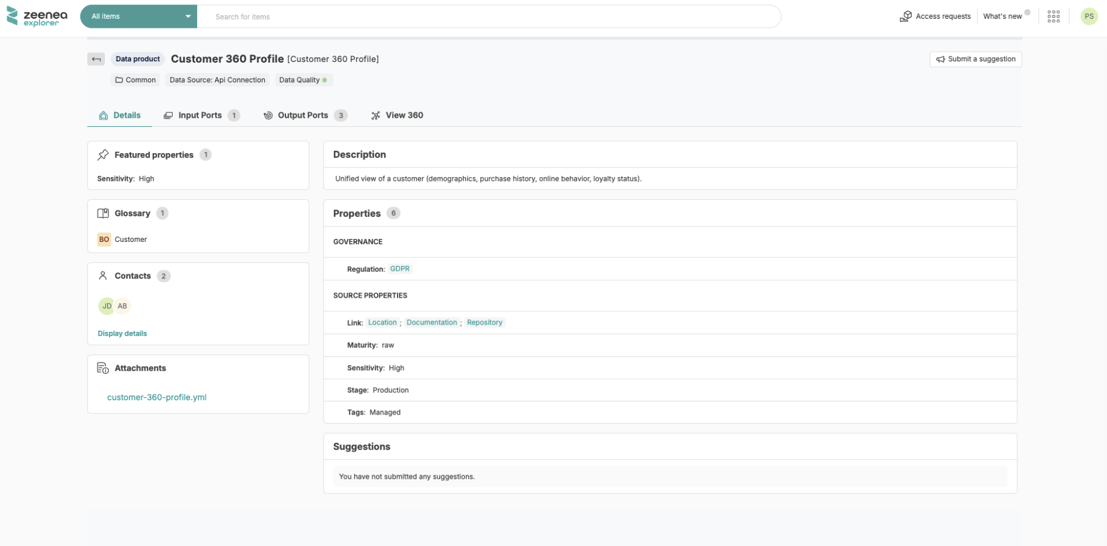
In the Studio, data product attributes can be updated from their side panel and details page, as well as using bulk actions and file import.
Input Ports Tab
In the Input ports tab of a data product, all the sources consumed by the data product's input ports are listed. Input ports themselves are displayed only in the lineage.
Output Ports Tab
In the Output ports tab of a data product, all the output ports to be consumed by the end-users are listed.
Data Quality Status
The data quality status of a data product is calculated from the data quality status of its output ports.
Attachments
From the Explorer, you can download the YAML descriptor of the data product.
Output Port Attributes
General Information
Output ports have common attributes as follows:
- Name / Source name
- Description / Source description
- Properties / Source properties
- Contacts / Source contacts
- Links with custom items
- Catalog (inherited from the parent data product)
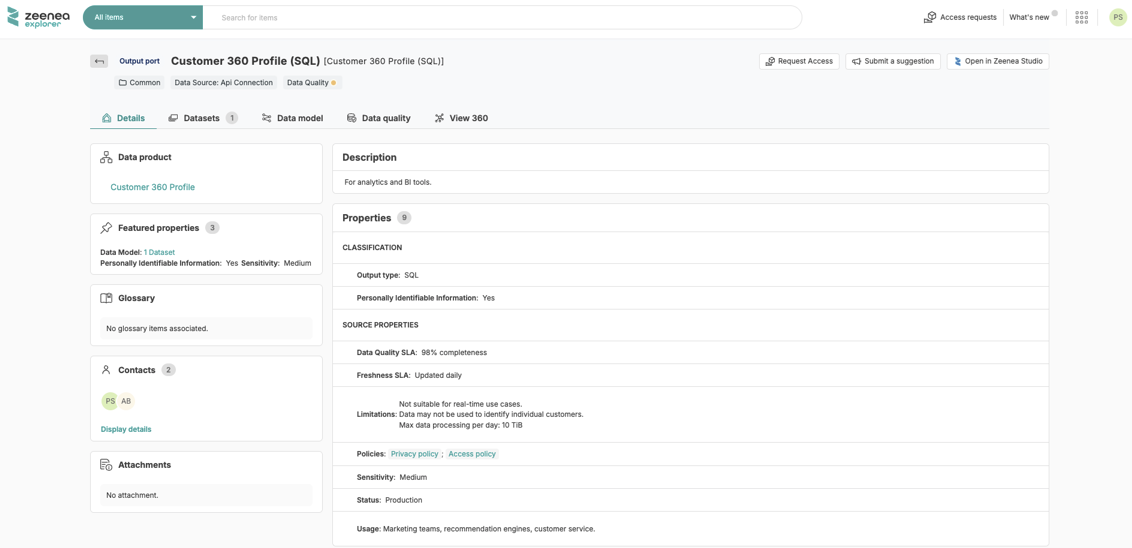
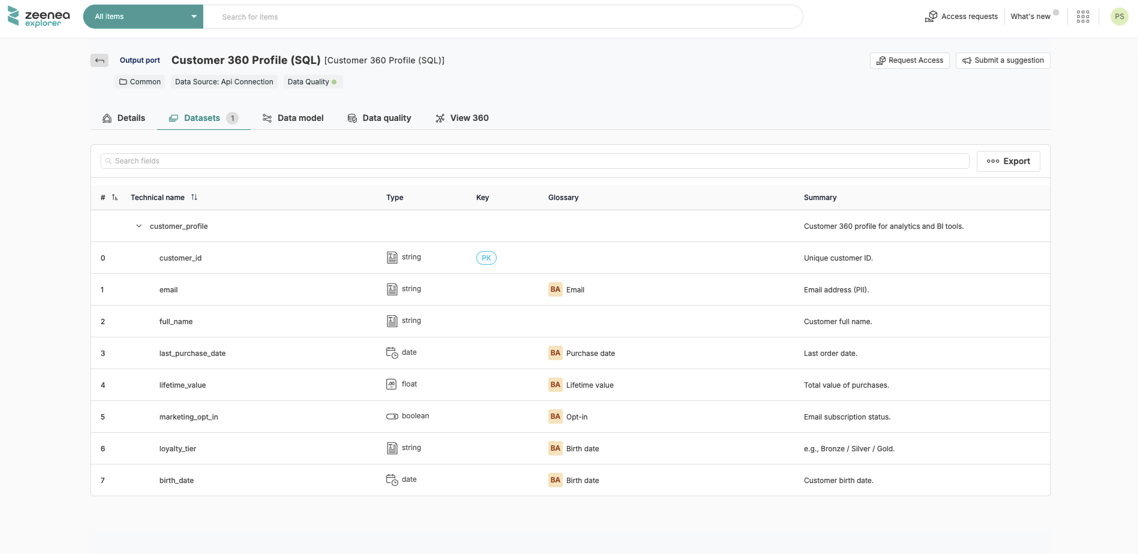
Datasets Tab
The Datasets tab lists all the datasets and their fields that compose the output port.
Data Model Tab
The Data model tab shows the relations between the datasets of the output ports.
Note: These links can be specified through the YAML descriptors or through the Catalog API.
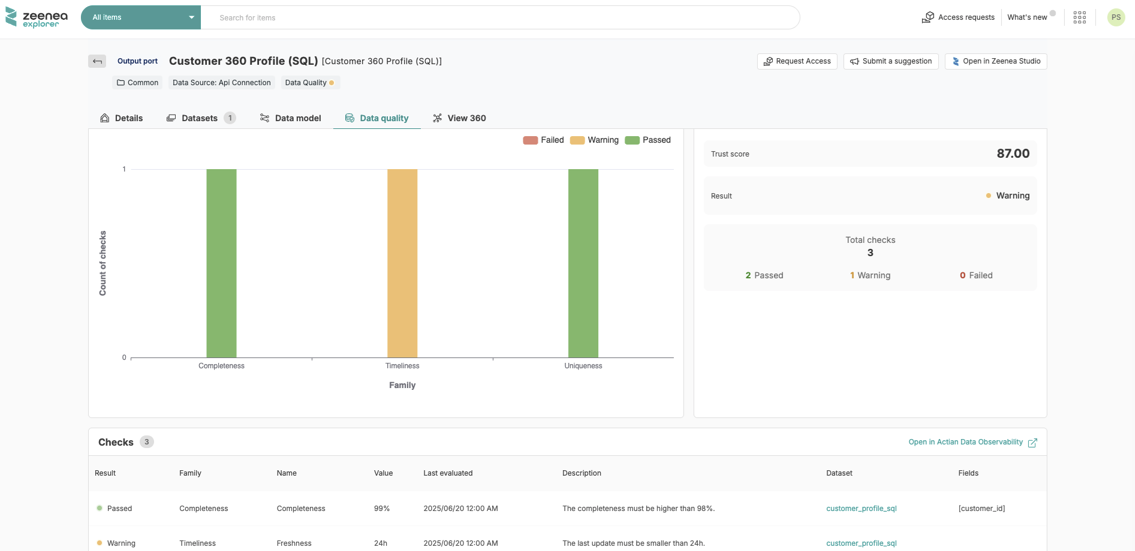
Data Quality Tab and Status
The Data quality tab lists all the checks that have been performed for all the datasets that compose the output port. For each check, a link allows the user to open the side panel of the dataset this check refers.
The data quality status of the output port is calculated from the quality status of its datasets.
Attachments
From the Explorer, you can download the YAML descriptor of the data contract attached to this output port.
Delete a Data Product
You can delete a data product from the Studio. When you delete a data product, its output ports and the datasets that compose them are deleted automatically.
Share a Data Product in Marketplace
Data products can be shared in the marketplace when the federated catalog option is activated. When you share a data product, its output ports and the datasets that compose them are shared automatically.
Move a Data Product to Another Catalog
From the Studio, you can move a data product to another catalog when the federated catalog option is activated. When you move a data product, its output ports and the datasets that compose them are moved automatically.
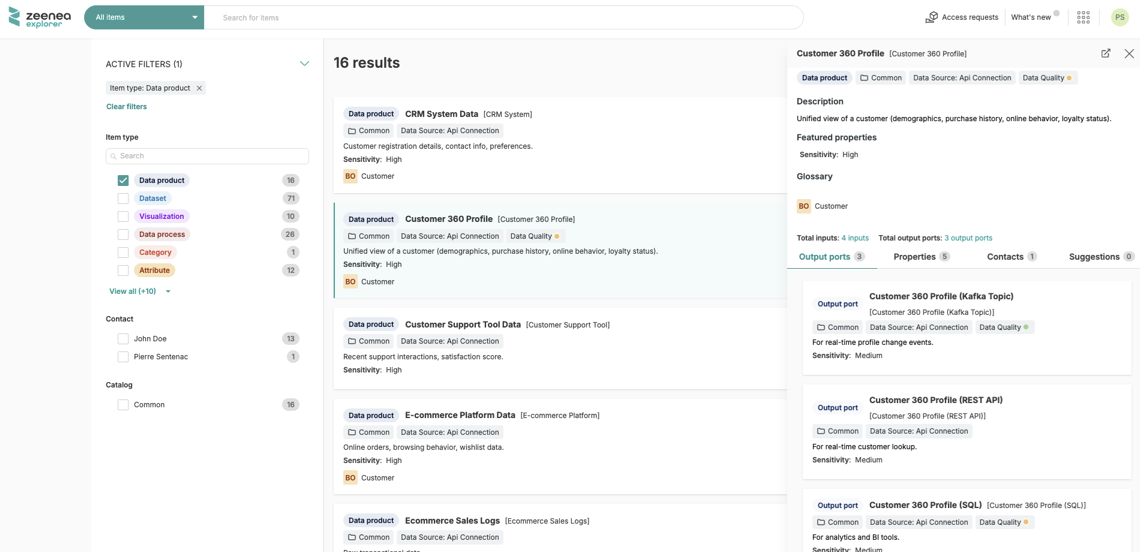
Search for Data Products
In the Explorer and the Studio, you can search data products by their own attributes or those of their output ports. Output ports and their embedded datasets are not displayed in search results.
Request Access to a Data Product
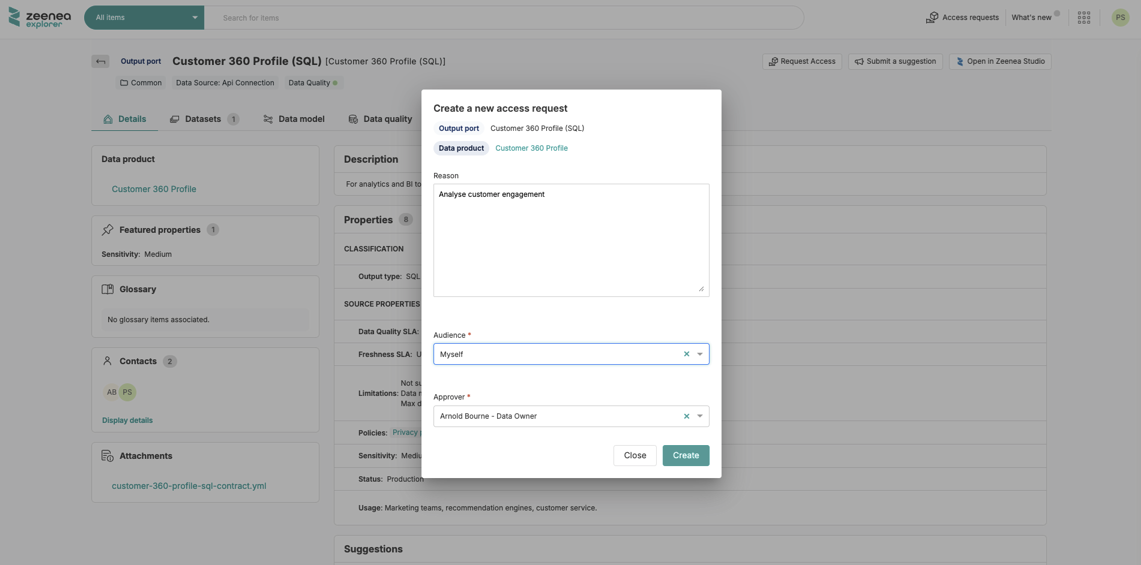
An Explorer user can request access to data products at the output port level.
You can enable access requests for data product output ports in Administration. Curators must then activate the feature for each output port, just as they do for datasets and visualizations.
Last modified date: 04/22/2026