Databricks Delta
To connect a Databricks Delta table to Actian Data Observability, you'll need to gather specific information from your Databricks instance.
Follow the steps below:
Follow the steps below:
- Capture Connection Details
You can find the JDBC connectivity details in the Databricks workspace console: Navigate to Compute -> Cluster -> Cluster Name -> Configuration -> Advanced Options -> JDBC/ODBC. Capture the following details:- Server Hostname
- Port
- HTTP Path
For more information, refer to the : Databricks ODBC and JDBC Drivers - Generate a Security Token
A security token is required to connect to the cluster remotely. Create this token from the Databricks workspace console:- Go to the top right corner and click on your User Name -> User Settings -> Access Token -> Generate New Token.
- Capture the token created.
For detailed instructions, see the Authentication for Databricks tools and APIs - Identify Table Details
From the Data section in the Databricks workspace, identify the database and table you want to connect.
Source in Actian Data Observability
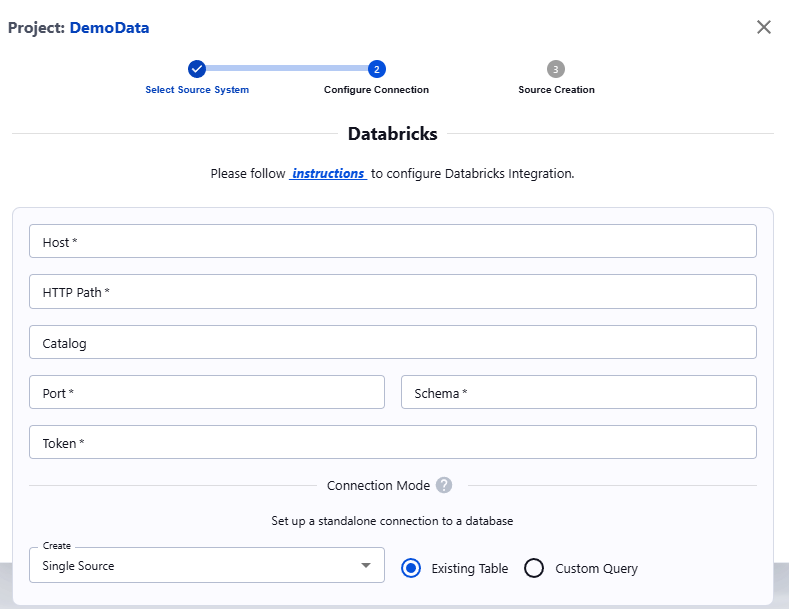
Once you have the necessary information, navigate to the Actian Data Observability UI and enter the following properties:
- Host: Cluster hostname
- Port: Cluster port
- Schema: Schema name (i.e., database name)
- Catalog (Optional): Unity catalog name
- HTTP path: HTTP path of the cluster
- Token: API token
Last modified date: 03/20/2026