Jira Integration
You can now integrate your Jira instance with Data Observability to simplify issue creation and tracking. This integration allows you to create and manage Jira tickets directly from generated alerts in Data Observability.
Connect to Jira
To integrate your Jira instance:
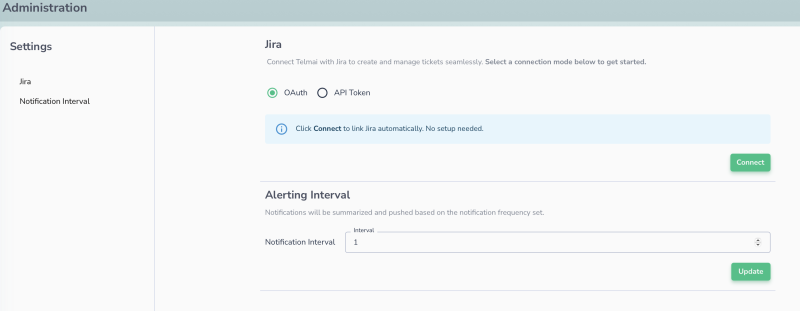
- Navigate to the "Administration" page. (Admin access is required)
- Choose connection Mode (OAuth or API Token).
- Click Connect. You’ll be redirected to Jira for authentication.
- You have now connected to your Jira instance.
- You can also update the Notification Interval. Default value is 1 minute.
Create Jira Tickets
To create Jira tickets:
- Navigate to the Trends & Alerts page.
- Choose a scan with alerts.
- Click the Create Issue button. A modal will appear to request additional details.
- Specify the project and issue type. Data Observability will auto-fill the summary and description, but you can edit them if needed.
- Click Create to generate the Jira ticket.
View & Manage Created Ticket
After creating Jira tickets, you can view and manage them directly from Data Observability:
- Go to the Trends & Alerts page.
- Click the See Issues button.
- Data Observability displays a list of open tickets created through the platform.
- Options:
- Click the ticket to navigate to your Jira instance
- Unlink the ticket from Actian Data Observability
- View ticket status
Last modified date: 03/20/2026