Encryption Key Management
In an encrypted database, tables are encrypted on disk by randomly chosen table keys. These keys are encrypted by the database encryption key. The database encryption key is derived from the randomly chosen main key. The main key in turn is secured by the passphrase. A standard algorithm, called PBKDF (Password Based Key Derivation Function), is used to derive an encryption key, called “protection key”, from the passphrase, then this protection key is used to encrypt the main key. The “protection key” is not stored anywhere.
The ALTER PASSPHRASE statement lets you change the passphrase which protects the main key. If the WITH option NEWKEY is specified, not only the passphrase but also the main key is changed. This in turn changes the database encryption key as it is derived from the main key. But the table keys are left untouched.
The WITH option STASH for the ALTER PASSPHRASE statement allows the passphrase to be encrypted and stashed in an internal database system file. The database server can retrieve the stashed passphrase and make the database accessible without the need to first unlock the database. This convenience is traded off with slightly decreased security due to the stashing of the passphrase. A database with its passphrase stashed cannot be locked and DISABLE PASSPHRASE produces an error. If the passphrase is currently stashed, then running ALTER PASSPHRASE without the STASH option erases the passphrase from the stash.
The WITH option PBKDF=(…) for the ALTER PASSPHRASE statement lets you specify certain parameters for the PBKDF standard algorithm. The parameters are specified as a comma separated list of name=value pairs within the parenthesis of the option PBKDF=(…). For more details about these parameters see the documentation of the ALTER PASSPHRASE SQL statement in the “SQL Reference Guide”.
The concept of the main key, from which the database encryption key is derived, also permits to derive different encryption keys for other purposes. Therefore, every database has a main key and consequently also a passphrase to secure the main key. By default, the passphrase for encrypted databases is required from the creator of the database and is not stashed. On the other hand, for not encrypted databases the passphrase is internally generated and stashed. Even though not encrypted databases now have a main key and passphrase, the stashing of this passphrase allows the full management of the database without having to know and handle the passphrase.
The ALTER KEYS statement lets you change the table keys without changing the passphrase and the main key. For each table in a database, the system randomly chooses a key for encryption/decryption operations.
These keys are encrypted with the database encryption key.
Note: The ALTER PASSPHRASE operation requires the AUTOCOMMIT setting to be ON; otherwise, an error will occur.
After the passphrase and main key are changed, restoring from pre-existing checkpoints requires the old passphrase from the user if it was not stashed. Also, it is not possible to roll forward log records beyond the ALTER PASSPHRASE statement. It is therefore recommended to take a new checkpoint after altering the passphrase to ensure disaster recovery operations can be performed properly.
Restoring an Older Checkpoint Before ALTER PASSPHRASE WITH NEWKEY
The following precautions are necessary to restore and rollforward from an old checkpoint that was done before changing the passphrase and main key with ALTER PASSPHRASE WITH NEWKEY.
The command "rollforwarddb", used to restore a checkpoint and roll forward transactions, depends on information in the database config file named "aaaaaaaa.cnf". This file is in the DATABASE location of the database and a copy of it may exist in the DUMP location. ALTER PASSPHRASE WITH NEWKEY updates encryption information in this file in both locations. However, to restore from an old checkpoint, taken before the passphrase change, the old encryption information is needed. As it is not possible to rollforward the passphrase change itself and beyond it, a rollforward from such an old checkpoint also must be restricted to stop before the passphrase change happened. Therefore, the following preparations are important before changing the passphrase so that you can later restore and roll forward from checkpoints created before the passphrase change.
Before changing the passphrase WITH NEWKEY do the following:
• Note down and remember the current date and time (wall clock time).
• This will be needed to stop a rollforward from a previous checkpoint before it reaches the following passphrase change.
• Remember the old passphrase (i.e. the current passphrase before changing it).
• Save a copy of the current database config file, as it contains the encryption information that corresponds to the previous checkpoint.
• If the database is journalled, then advance to the next journal file by running the command:
alterdb -next_jnl_file <dbname>
• Finally, change the passphrase WITH NEWKEY and perform a new checkpoint.
To restore an old checkpoint before a passphrase change do the following:
• Convert the remembered date-time (noted down before the passphrase was changed to California time (time zone PST).
• Save a copy of the current database config file.
• Restore the old copy of the database config file (copied before the passphrase was changed) that corresponds to the checkpoint into the DATABASE location.
• Unlock the database with the old passphrase by connecting to iidbdb and run the SQL statement:
ENABLE PASSPHRASE <old passphrase> ON DATABASE <dbname>;
• To restore the old checkpoint using the "rollforwarddb" command specify the following:
• the checkpoint sequence number as identifier for the desired checkpoint,
• the roll forward end time (as California, PST time):
rollforwarddb +c '#c<ckp number>' -eDD-MMM-YYYY:hh:mm:ss <dbname>
Example:
To restore the checkpoint with sequence number 4 and stop the roll forward at 5:28:13 pm on16th December 2025 (California time, PST), run the following command:
rollforwarddb +c '#c4' -e16-Dec-2025:17:28:13 <dbname>
It is recommended to exercise the whole procedure, including the preparation steps as suggested in the section Before changing the passphrase WITH NEWKEY, on a test system to be sure that it can be successfully performed in case of a real situation needing the restore of an old checkpoint.
The following illustration explains how key management works: 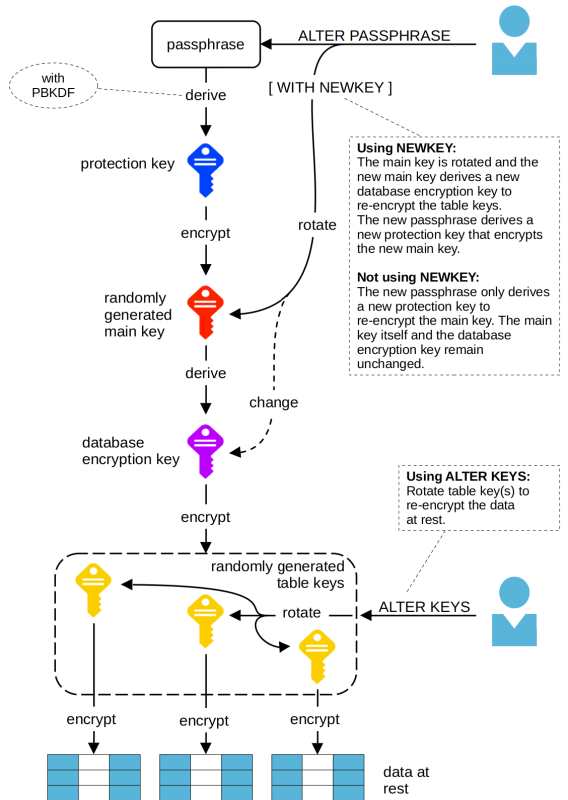
Last modified date: 09/11/2026