Actian Ingres Components and Tools
To use this guide effectively, you should be familiar with the basic components of Actian Ingres, client/server concepts, and the Actian Ingres tools required to configure, maintain, and view data.
The basic components of Actian Ingres are as follows:
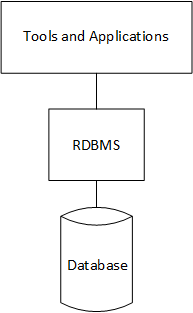
• The Relational Database Management System (RDBMS)—The Relational Database Management System is a set of Actian Ingres processes. This set includes the processes that make up the DBMS Server and those that make up the logging and locking system. All of these processes work together to process queries from users running applications or using Actian Ingres tools.
• The database—The database is the structure in which the RDBMS stores the data.
Client/Server—The Actian Ingres database management system is the server that processes requests from clients. The Actian Ingres tools and database applications are the clients.
Relationships among Actian Ingres components and tools are illustrated here:
The Actian Ingres tools for configuring, maintaining, and viewing data include the following (commands to invoke these tools are shown in parentheses). For a description of each tool, see the System Administrator Guide.
Standalone Tools
• Director (director)
Forms-based Tools
• Configuration-By-Forms (cbf)
• Net Management Utility (netutil)
• Terminal Monitor (isql)
• Report-By-Forms (rbf)
• Query-By-Forms (qbf)
• Applications-By-Forms (abf)
Visual Tools (available on Windows only)
• Configuration Manager (vcbf)
• Visual Manager (ivm)
• Visual Performance Monitor (vdbamon)
• Journal Analyzer (ija)
• Import Assistant (iia)
• Export Assistant (iea)
• Visual Configuration Differences Analyzer (vcda)
• Visual Database Objects Differences Analyzer (vdda)
• Visual SQL (vdbasql)
• Visual DBA (vdba)
• Network Utility (ingnet)
The Actian Ingres tools for developing customized applications include the following. For instructions on using these tools, see the Forms-based Application Development Tools User Guide.
• Vision
• Ingres 4GL
Last modified date: 07/21/2025