White-Labeling
Overview
White-labeling allows you to customize the appearance of Actian Data Intelligence Platform applications with your organization's branding. You can replace selected branding elements to create a consistent experience for your users while preserving standard platform functionality.
White-labeling is supported for the following applications:
- Studio
- Explorer
- Administration
You can apply your branding across all supported applications or to individual applications, depending on your requirements.
This document describes the branding inputs required to create a high-quality branded experience.
Supported Customizations
The following branding elements can be customized as part of white-labeling:
| Customization | Support Level | Details |
|---|---|---|
| Application Logo | Supported | Single logo for all applications or application-specific logos |
| Favicon | Supported | Single favicon or application-specific favicons |
| Primary Brand Color | Supported | Replaces Actian primary color |
| Fonts | Limited | Explorer homepage heading (H1) only |
| Email Branding | Supported through webhook integration | Logo and primary color only |
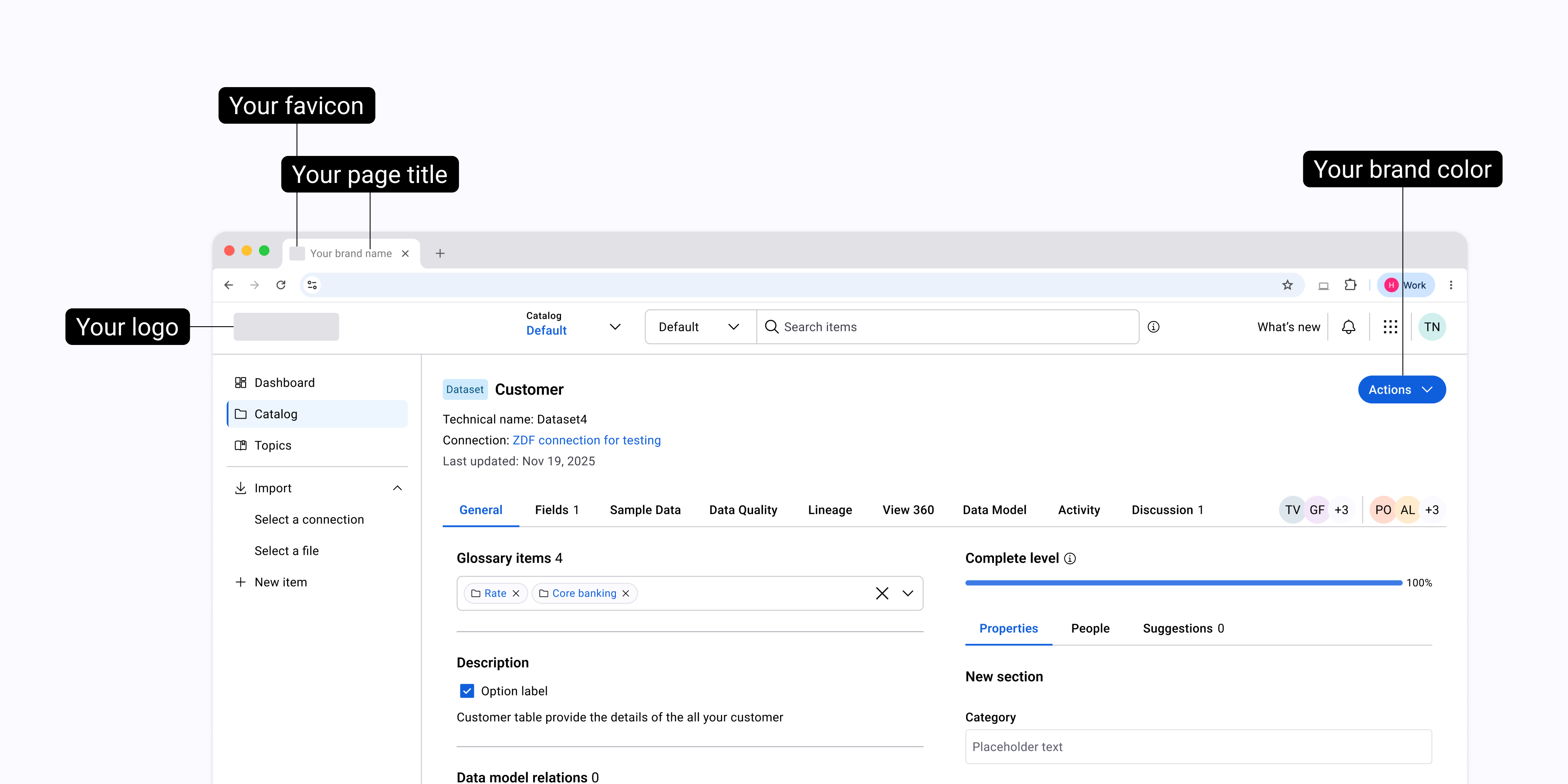
The following illustration shows the branding elements that you can customize across supported applications, including the application logo, favicon, browser page title, and primary brand color.
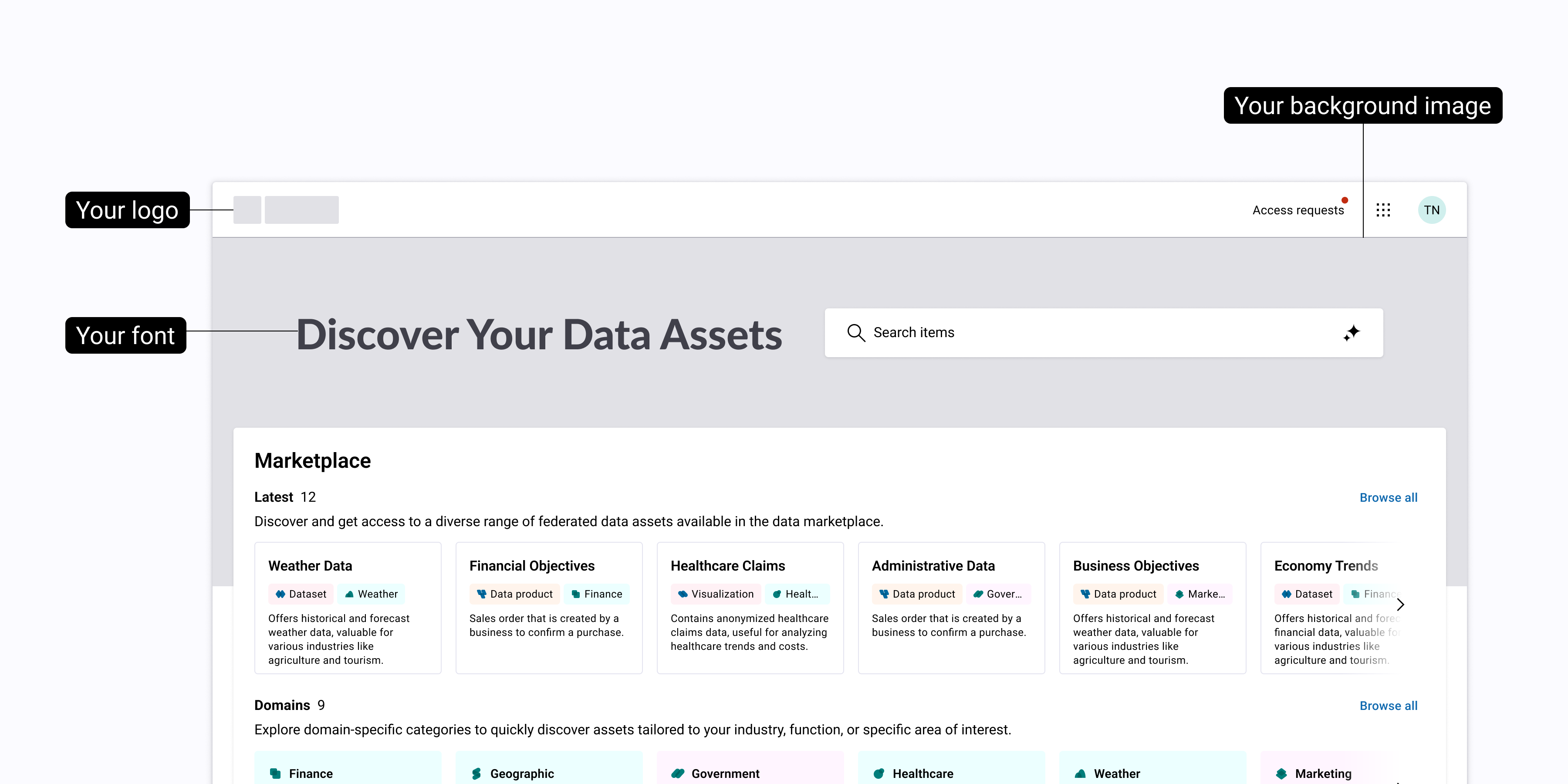
The following illustration shows the branding elements that you can customize on the Explorer homepage, including the application logo, heading font, and background image.
Branding Inputs
Provide the following branding assets and text inputs based on your requirements.
Required Assets
- Application logo
- Favicon
- Primary brand color
Optional Asset
- Explorer homepage heading (H1) font
Note
The Actian Design team will customize the Explorer homepage background image based on the colors you provide.
Required Text Inputs
-
Browser page title text: Text displayed in the browser tab and window title.
-
Application names: Text used in application navigation and actions, for example, Open in <custom Studio name>.
Important
Application names and Browser page title text must not contain the characters
&,<, or>. Use spelled-out words instead (for example, useandinstead of&). -
Support URL: The URL used for support links within the applications. If not provided, the default Actian support URL is used.
Note
These inputs are required to complete white-labeling for supported areas and must be finalized before implementation.
Asset Specifications
All assets must meet the following specifications for approval.
Application Logo
You can use a single logo across all applications or provide application-specific logo variants. Application-specific logos should maintain a consistent visual identity while adapting colors or backgrounds when necessary.
Logo Specifications
| Requirement | Specification |
|---|---|
| File format | SVG |
| Background | Transparent |
| Minimum size | 256 × 256 px |
| Maximum file size | 1 MB |
| Color mode | RGB |
Additional Requirements
- Logos must remain legible at small sizes, such as in headers and loading screens.
- If a logo cannot maintain sufficient clarity at small sizes, provide a simplified variant.
Note
Your organization is responsible for logo design and branding strategy.
Favicon
Favicons are displayed in browser tabs and bookmarks.
You can provide a single favicon for all applications or application-specific favicons, depending on your requirements.
Favicon Specifications
| Requirement | Specification |
|---|---|
| File format | SVG |
| Aspect ratio | Square (1:1) |
| Scope | Single favicon or application-specific favicon |
Note
If no favicon is provided, the standard application logo is used.
Primary Brand Color
You can provide one primary brand color for your organization. The platform derives the required color shades from your primary brand color to support UI states such as hover, active, and disabled, while maintaining consistent theming across the platform.
Color Specifications
| Requirement | Specification |
|---|---|
| Format | HEX value |
| Usage | Replaces the default primary color |
| Accessibility | Must meet WCAG AA contrast requirements |
Color Limitations
- Gradients and secondary color palettes are not supported.
- Color adjustments might be recommended if the selected color affects accessibility or usability.
Font
You can customize the font used for the Explorer homepage heading (H1) only. All other platform text uses the default Roboto font.
Font Specifications
| Requirement | Specification |
|---|---|
| Scope | Explorer homepage heading (H1) only |
| File format | TTF |
| Licensing | Proof of web embedding or distribution rights required |
Important
Fonts may be rejected if they negatively affect layout or readability.
Email Branding
Email branding supports limited customization through webhook integration. For more information about configuring webhooks, see Managing Notifications.
Supported branding elements include the logo and primary brand color.
For more information, contact your Customer Success Manager (CSM).
Package and Submit Branding Assets
Provide all branding assets in a single ZIP archive using the following folder structure.
Important
File names must clearly indicate their intended use.
Folder Structure
white-labeling-assets/
│
├── logos/
│   ├── studio-logo.svg
│   ├── explorer-logo.svg
│   └── admin-logo.svg
│
├── favicons/
│   └── favicon.svg
│
├── fonts/
│   └── explorer-h1.ttf
│
└── brand-color.txt
Note
Incomplete or incorrectly packaged submissions may delay review and approval.
Actian repackages your submitted assets into the required deployment format. You do not need to match platform-internal filenames.
Asset Validation and Review
Submitted assets are reviewed to ensure they meet the specifications in this document, including:
- Completeness against the specifications in this document
- Visual clarity at the required formats and sizes
- Accessibility and contrast compliance
- Consistency across applications
After implementation, a branded version of the platform may be shared with you for review and approval.
Note
If revisions are required, feedback will be provided before final approval.
Implementation begins after all required assets are received and approved.
Unsupported Customizations
The following customizations are out of scope for white-labeling:
- Custom UI layouts or structural changes
- Multiple themes within a tenant
- Custom icons other than logos and favicons
- Email template redesign or copy customization
- Application behavior or feature changes
Requests outside this scope require separate review and agreement.