Dataset Detection on File Systems
Introduction
The purpose of this document is to detail the rules applied in File System-type Zeenea connector to detect Datasets.
The algorithm checks all the objects from the root path and identifies if they are datasets. Once a folder is identified as a dataset, the algorithm stops its treatment and goes to the next folder.
Folder Containing Only Files
Rule 1
A folder is a dataset when it only contains files and when at least one file has a supported extension.
Supported extensions are: csv, parquet, orc, xml, json, avro
 |  |
|---|---|
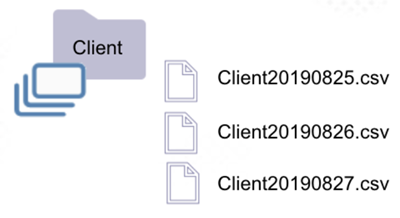
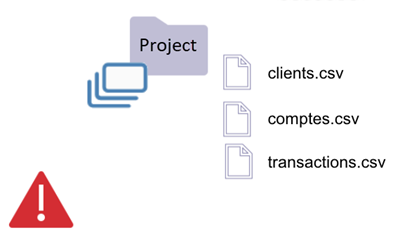
| * The "Client" folder is a dataset (rule 1). | * The "Project" folder is considered a unique dataset (rule 1). |
| * The folder contains only files, and at least one of them has a supported extension. | * The folder contains only files, and at least one of them has a supported extension. |
| * Zeenea will extract the Schema from the most recent file (in this case, Client20190827.csv). | * Zeenea will extract the schema from the most recent file. |
| * If the files are not homogenous, the documented schema may then change upon the analysis treatment. |
Folder with Subfolders
Rule 2
When a folder contains a sub-folder, whose name doesn't follow partition naming conventions, that folder is not a dataset.
Rule 3
A file may be a dataset when it is within a folder containing sub-folders. The file must however possess a supported extension.
 |  |
|---|---|
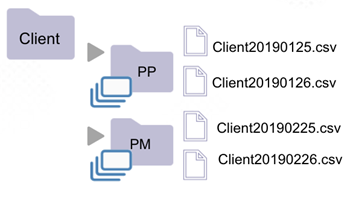
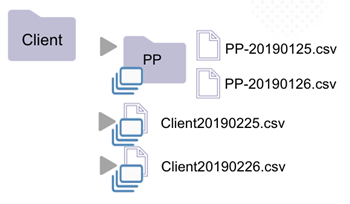
| * The "Client" folder is not a dataset (rule 2). | * The "Client" folder is not a dataset (rule 2). |
| * It contains subfolders PP and PM, whose names do not follow dataset naming convention. | * It contains subfolder PP, whose name does not follow dataset naming convention. |
| * Sub-folders PP and PM are, however, datasets (rule 1). They only contain files. | * The "PP" folder is a dataset (rule 1). It only contains files. |
| * Files "Client20190225.csv" and "Client20190226.csv" are datasets (rule 3). * Files with a supported extension. |
Folder with Partitions
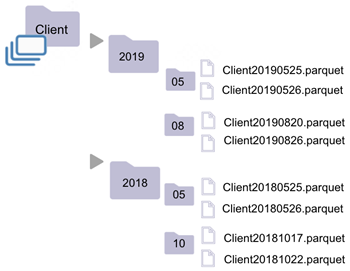
Rule 4
A folder is a dataset when:
- All its subfolders' names follow the partition naming convention.
- At least one of its subfolders would be considered as a dataset had it been isolated.
 |  |
|---|---|
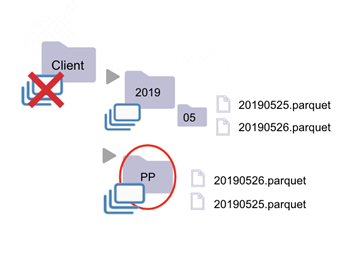
| * The "Client" folder is a dataset (rule 4). | * The "Client" Folder is not a dataset (rule 2). |
| * "Client" contains subfolders "2019" and "2018", whose names follow the dataset naming convention. | * It contains subfolders "PP" and "2019", whose names do not follow the dataset naming convention. |
| * "2019" would have been a dataset, had it not been contained within "Client" (rule 3). | * Sub-Folder 2019 is a dataset (rule 4). Its subfolder would be considered a dataset had it been isolated. |
| * "2019" contains subfolders "05" and "08", whose names follow the dataset naming convention. | * Sub-folder "PP" is a dataset (rule 1). It only contains files. |
| * "08" would have been a dataset, had it not been contained within "2019" | |
| * "08" only contains files, of which at least has a supported extension. |
Partition Naming Convention
Subfolders are considered partitions if their names match this regular expression:
"(.*=.*)", "[0-9]{8}", "[0-9]{4}", "[0-9]{2}", "0?[1-9]|1[012]", "0?[1-9]|1[0-9]|2[0-9]|3[0-1]"