djMessage Objects
Message objects are powerful tools for handling and managing small amounts of data throughout the life cycle of an integration runtime without the overhead of writing to or reading from disk. This is often the case after you get a file from an FTP directory or a message from a queue and have to use it in the integration workflow.
Message object variables have methods, properties, and operators that appear in the Script Editor navigation tree. The objects are used in maps and processes as inputs or outputs. They were originally designed to support connections to the various message queuing systems and later extended to support the other step types. Additionally, they can be referenced in the file scripting functions and used as a source or target in transformation maps that use file-based connectors using the URI Scheme djMessage:///myMsg.
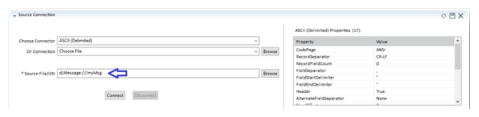
Note: You cannot connect directly to the message object in the Studio IDE as it is a memory object that is not available until runtime. However, you can use a macro name and change the value to the URI when appropriate.
Since message objects were intended for moving data in memory and avoiding disk I/O, message objects have some practical and hard constraints. For multi-byte encodings, you will start to see a limit near 512 MB but for single-byte encodings such as ASCII or Binary, you will see limits when the data size approaches 2 GB. Practical limitations are effective sooner if the server on which you are running the integration has limited memory.
You must declare message object variables in the Global Variables section of the map or process Configuration tab so that they are available for selection in the Script Editor tree. Generally, you must use the Start step in a process or the TransformationStarted event in a map to initialize the variables. Use the FindMessage() function to reuse a public variable that was passed from a calling process.
' If a message with this name is available, it will be used
Set msgIn = FindMessage("msgIn")
' If a message with this name is not available, one will be initialized
If msgIn is Nothing Then
Set msgIn = new DJMessage "msgIn"
End If
Make sure to clear the message object at the end of a process workflow or as soon as it’s no longer needed. This is useful when reusing the message object, as it ensures that the second use does not contain anything from the first use.
The clear property/method, when called, will set the body of the message object to an empty string (""), and will remove all properties that have been set on the message:
'The following code creates a new message and clears the message body.
dim MyMessage as djmessage
set MyMessage = new djmessage “message”
MyMessage.clear
For detailed usage and sample syntax, see DJMessage Object Type.
Last modified date: 10/14/2026