Adding a DBT Connection
Prerequisites
- A user with sufficient permissions is required to establish a connection with DBT.
- Zeenea traffic flows towards DBT must be open.
Note: You can find a link to the configuration template in Zeenea Connector Downloads.
Supported Versions
The DBT connector was tested with version 1.3. It is compatible with version 1.3 and earlier.
Note: The DBT connector is currently NOT compatible with DBT Cloud.
Installing the Plugin
The DBT plugin can be downloaded here: Zeenea Connector Downloads.
For more information on how to install a plugin, please refer to the following article: Installing and Configuring Connectors as a Plugin.
Declaring the Connection
Creating and configuring connectors is done through a dedicated configuration file located in the /connections folder of the relevant scanner.
Read more: Managing Connections
In order to establish a connection with an DBT instance, specifying the following parameters in the dedicated file is required:
Parameter | Expected value |
|---|---|
name | The name that will be displayed to catalog users for this connection. |
code | The unique identifier of the connection on the Zeenea platform. Once registered on the platform, this code must not be modified or the connection will be considered as new and the old one removed from the scanner. |
connector_id | The type of connector to be used for the connection. Here, the value must be dbt and this value must not be modified. |
connection.path | Path to the DBT projects. Must be formatted like: - AWS S3: s3://[bucket_name]/[optional_prefix] - Google Storage: gs://[bucket_name]/[optional_prefix] - Local File System: file:///path/to/project/folder/root or /path/to/project/folder/root - (≥2.8.0) Azure ADLS Gen 2: http://[account_name].dfs.core.windows.net/[container_name]/[optional_prefix] - (< 2.7.0) Azure Storage: az://[bucket_name]/[optional_prefix] Examples: connection.path = "aws://dbt-bucket/projects" or connection.path = "/var/dbt/projects" |
Google Cloud Storage | |
connection.google_cloud.json_key | JSON key either as: - an embedded raw value (use triple quotes """{ "json: "here" }""") - or as a file by setting a absolute file URL (e.g., file:///etc/bigquery/zeenea-key.json) Using the file URL to an external JSON key file is recommended. |
connection.google_cloud.project_id | Project Id used at connection. Invoices will be sent to this project. |
AWS - S3 In version 2.7.0 and later, the connector uses the official Amazon SDK. So the following parameters can be set to specify a region and an access key. If not set, information will be taken from: 1. environment variables 2. shared credential and config files 3. ECS container or EC2 instance role See Amazon documentation. | |
connection.aws.region | Added in 2.7.0 Amazon S3 region |
connection.aws.access_key_id | Amazon S3 Access Key Identifier. Prefer to use container or instance role for versions 2.7.0 and later. |
connection.aws.secret_access_key | Amazon S3 Secret Access Key. Prefer to use container or instance role for versions 2.7.0 and later. |
Azure ADLS Gen 2 In version 2.8.0 and later, the connector can fetch the files from ADLS Gen 2. Two authentication methods are available: 1. Service Account OAuth2 credentials (client_id, client_secret, tenant_id) 2. Account Key (account_name, account_key) | |
connection.azure.tenant_id | Tenant Identifier |
connection.azure.client_id | Client Application Identifier |
connection.azure.client_secret | Client Application Secret |
connection.azure.account_name | Storage Account Name |
connection.azure.account_key | Storage Account Secret Key |
Azure Storage Azure Storage support is discontinued in version 2.7.0 of the connector. If you need it, please contact support for it to be added again. | |
connection.azure.account_name | Before 2.7.0 The Storage Account Name |
connection.azure.account_key | Before 2.7.0 Account Key; can be retrieved in the Access Key section of the Azure menu. |
multi_catalog.enabled | Set to true if the dataset source system is also configured as multi catalog. Default value false. |
dbt.profiles_yml | (Optional) Path to the profiles file. Must be formatted like: - Amazon S3: s3://bucket_name/path/to/profiles.yml - Google Storage: gs://bucket_name/path/to/profiles.yml - (≥2.8.0) Azure ADLS Gen 2: http://[account_name].dfs.core.windows.net/[container_name]/[optional_prefix] - File System: file:///path/to/profiles.yml or /path/to/profiles.yml If not set, the first found file will be used: -$DBT_PROFILES_DIR/profiles.yml - $HOME/.dbt/profiles.yml - /profiles.yml Note: The YAML should not contain anchors or references. |
dbt.target | (Optional) Target environment name. If not set the default target of the profile is used. |
Data Extraction
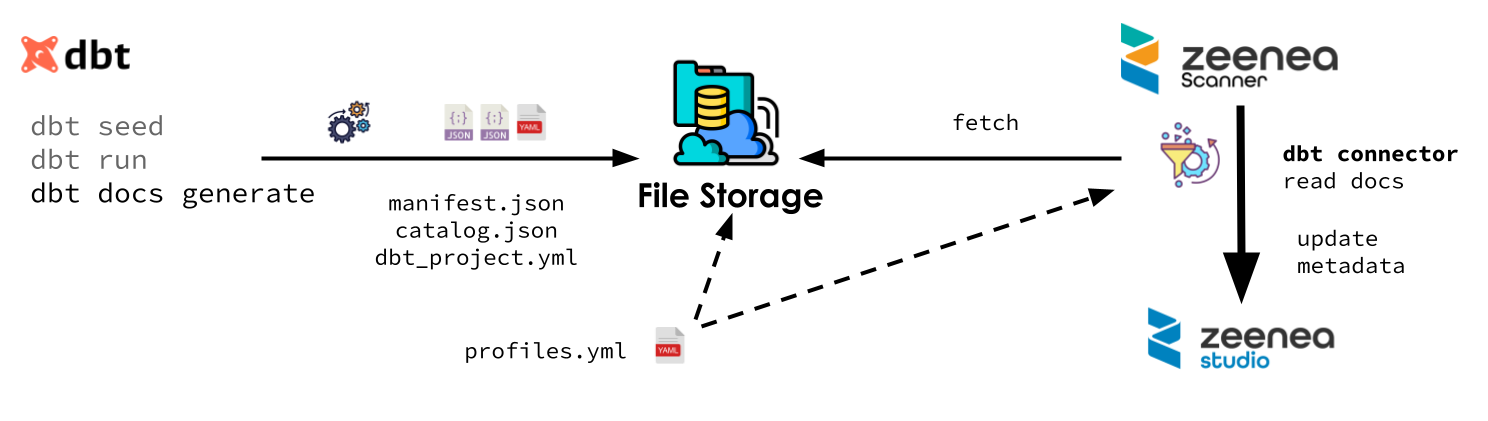
In order to collect metadata, the user must provide the DBT files to the connector.
These files can be in the file system of the computer where the scanner is installed. The file system can be local or a mounted network file system (an NFS mount, for instance). It can also be an Amazon S3 or a Google Cloud Storage bucket.
Finding Projects
First, the connector walk though the file storage from the root given in the parameter connection.path and search for files with the name dbt_project.yml.
For each dbt_project.yml file found, it will consider the folder to be a DBT project. The identifier of items from a project is prefixed by the path of the project folder relative to the connection.path in order to ensure the identifier unicity.
Extracting Metadata
Metadata is extracted from manifest.json and catalog.json. These two files are produced when running the DBT process. Their location is given by the optional target-path entry in dbt_project.yml. If not set, they will be found in the target subfolder of the project.
The connector needs some extra information about the data source from the profile.yml file. This file can be shared by all project. It can be the same file used in production are a similar one with all connection information except the credentials.
For a given project, the connector uses the profile defined by the profile entry in dbt_project.yml. The target used is either the target defined by dbt.target in the connector configuration or the default one defined in the profile.
Pre-required DBT commands
manifest.json and catalog.json are produced when running DBT. To ensure they are complete, the following commands should be executed.
- dbt seed: https://docs.getdbt.com/reference/commands/seed
- dbt run: https://docs.getdbt.com/reference/commands/run
- dbt docs generate: https://docs.getdbt.com/reference/commands/cmd-docs
Collected Metadata
Synchronization
The connector will synchronize all DBT project's job and automatically represent them in the catalog.
Lineage
The DBT connector is able to retrieve the lineage between datasets that have been imported to the catalog. Datasets from other connections must have been previously imported to the catalog to be linked to the DBT process. This feature is available for the following systems and, for it to work, an additional parameter is needed in the configuration file of the source system connection as configured in the DBT connection configuration panel. For example, if the DBT process uses a table coming from a SQL Server table, then a new alias parameter must be added in the SQL Server connection configuration file.
Table summarizing the possible values of the alias parameter to be completed in the data source configuration file:
Source System | Model | Example |
|---|---|---|
Server name:port/Database name | alias = ["zeenea.database.windows.net:1433/db"] * | |
Server name/Database name | alias = ["kn999999.eu-west-1.snowflakecomputing.com/ZEENEA""] * | |
bigquery.googleapis.com/ + BigQuery project identifier | alias = ["bigquery.googleapis.com/zeenea-project"] | |
Server name:port/Database name | alias = ["zeenea.cthwlv3ueke2.eu-west-3.redshift.amazonaws.com:5439/database"] * |
* Do not fill in the database name if the configuration of the connectors is in multi_catalog.enabled = true.
Data Process
- Name
- Source Description
- Technical Data:
- Project
- Doc Generation Time
- Owner
- Database
- Schema
- Type
Unique Identification Keys
A key is associated with each item of the catalog. When the object comes from an external system, the key is built and provided by the connector.
Read more: Identification Keys
Object | Identifier Key | Description |
|---|---|---|
Dataset | code/path/type.packagename.resourcename | - code: Unique identifier of the connection noted in the configuration file - path: (Optional) Path to the project folder - type: Kind of materialization - package_name: Package name - resource_name: Resource name |
Last modified date: 04/22/2026