Using Backup Agent
A Reference for Using Backup Agent
A Review of Continuous Operations
Continuous Operations is a MicroKernel feature included with PSQL which provides you the ability to put data files in a temporary state so that you may backup data files while the database files are open and in use.
During a backup, open data files are typically omitted because they are open and in use. When turned on, Continuous Operations calls to the MicroKernel to open the selected files as Read-Only. Doing this allows the backup utilities to access and backup a static image of the selected files. Once the data files are open as Read-Only, the MicroKernel begins to record any changes made to the files in temporary delta files. These temporary delta files retain running versions of the files, complete with the changes that have transpired during the backup process.
The temporary delta files created by Continuous Operations mode have the same name as the corresponding data files but use the extension ".^^^" instead. No two files can share the same file name and differ only in their file name extension if both files are in the same directory. For example, do not use a naming scheme such as INVOICE.HDR and INVOICE.DET for your data files.
In the case of same name files, only one file will be placed in Continuous Operations. The Backup Agent log file will detail the file that is excluded from Continuous Operations. If all files are intended to be placed in Continuous Operations, review the log file and either place same name files in different directories or consider renaming files so that all are placed in Continuous Operations by Backup Agent.
After the backup is complete, the data files must be removed from Continuous Operations, at which time the changes stored in the delta files are rolled into the data files. The MicroKernel then deletes the delta files as soon as all changes are rolled into the data files.
Starting Continuous Operations
Starting Continuous Operations mode is handled in PSQL through BUTIL or the Maintenance utility, depending on the type of files you are accessing. The Maintenance utility is the interactive version of BUTIL and requires file paths.
Ending Continuous Operations
Ending Continuous Operations is also handled in PSQL through BUTIL or the Maintenance utility, depending on the type of files you are accessing. The utility you used to invoke Continuous Operations is the same utility you would use to end Continuous Operations.
The PSQL Advanced Operations Guide provides in-depth information on the Continuous Operations functionality provided in PSQL.
Why Use Backup Agent?
So why would you use Backup Agent if you already have the utilities available to start and end Continuous Operations for backing up PSQL databases? Because Backup Agent takes Continuous Operations a step farther. Backup Agent implements what we call intelligent Continuous Operations management.
With intelligent Continuous Operations management, files are placed into Continuous Operations automatically by the agent instead of a system administrator providing (and maintaining) a list of files that are to be backed up. This file management eliminates the need for butil -startbu scripts that can too often get out of date. It also eliminates putting files into Continuous Operations that are not opened by users during a backup session. Backup Agent handles only the files that are accessed and that need to be put into Continuous Operations. This can reduce the amount of data that is backed up during incremental or differential backup processes drastically.
Another good reason to use Backup Agent is because it integrates quickly and easily with most popular backup software products on the market.
The next section covers some of the issues surrounding data backup and precautions you should know when using Backup Agent.
Backup Agent Precautions
This section lists some precautions and considerations you should be aware of before you begin using Backup Agent.
Archival Logging
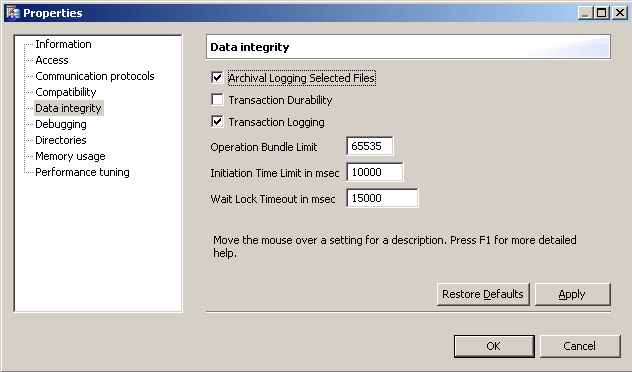
If you have enabled Archival Logging in PSQL, you must disable it before you can use Backup Agent. If you are uncertain if Archival Logging has been enabled, you can check the setting in PSQL Control Center to verify.
1
Access Control Center & Documentation from the operating system Start menu or Start screen.
2
The Properties dialog appears.
Figure 3-1 Archival Logging Setting in PCC.
3
Click Data integrity.
The Data integrity settings display in the right pane.
By default, the Archival Logging Selected Files option is not selected.
4
To disable Archival Logging, clear the Archival Logging Selected Files option, click Apply, and then click OK.
Caution The configuration change will not be applied until the PSQL database engine has been restarted.
Temporary Files
The MicroKernel locks temporary files. Consequently, Backup Agent does not place temporary files into Continuous Operations.
Note Attempting to put a temporary file into Continuous Operations results in a Status Code 85: The file is locked.
Files in a Read-Only Directory
In the scenario where a file resides in a read-only directory, the MicroKernel is unable to create a delta file, and Backup Agent does not put the file into Continuous Operations.
Note Attempting to put a file located in a Read-Only directory into Continuous Operations results in a Status Code 94: The application encountered a permission error.
Read-Only Files
Although read-only files cannot be accessed for Write operations, Backup Agent puts these files into Continuous Operations. The MicroKernel does not create the delta file, since there would be no updates to a read-only file. The MicroKernel will then return an error on any Write operation and the Write operation will be not be carried out. Since the delta file is never created, there is nothing left for Backup Agent to manage.
Remote Agent Activation
If your business rules dictate that you start and stop Backup Agent from a remote machine, you may do so using any of the remote access software applications available on the market. (For example, you may need to start Backup Agent using a Telnet session.)
Using Other Utilities
Using BUTIL or the Maintenance Utility to start Continuous Operations is strongly discouraged. If a file is put into Continuous Operations by another utility, Backup Agent cannot manage it. It is then your responsibility to remember to take the file out of Continuous Operations, using the same utility with which you put the file into Continuous Operations.
Performance Issues
To avoid a potential performance decline, you should always try and schedule your backup process to run during off-hours or periods of low data activity. It’s also important to be certain and stop the agent once your backup has completed. The following circumstances could impact your database application performance when running Backup Agent.
Note If a delta file grows to the 4 GB maximum size limit you will encounter Status Code 132: File full.
Caution Leaving Backup Agent on after your backup finishes not only creates large delta files that can slow down performance but can also compromise the integrity of your data.
Recovery Startup Timeout
In the event that you have files in Continuous Operations using Backup Agent and the server is restarted, there is a 30 minute limit for rolling in changes. If the 30 minute timeout is reached, Backup Agent logs the file at which the timeout occurred. Any delta file still active will continue to increase in size if database changes are still being made to the original file. The delta file continues to grow until the changes are rolled in to the original file. You can eliminate this situation by opening the original file using the Function Executor or PSQL Control Center to roll in the delta file.
Note If the timeout is reached during a file roll-in, all the changes made up to that point are retained. Any remaining changes are rolled in the next time the file is opened.
System Failure
If you are using Backup Agent with your backups and you encounter a hard drive failure, you cannot use Archival Logging and the Maintenance utility Roll Forward command to restore changes to your data files that occurred after the last backup. If a hard drive failure occurs, you will lose all changes to your data since the last backup.
If the server goes down while Backup Agent has files in Continuous Operations, Backup Agent detects the existing delta file and rolls in the changes when the server is restarted the next time.
Specifying Files for Continuous Operations
You can specify files for Backup Agent to include in Continuous Operations by specifying the files in the inclusion file (ifl.txt). Conversely, you can specify files to be excluded from Continuous Operations by using the exclusion file (efl.txt).
If you successfully installed Backup Agent, the include (ifl.txt) and exclude (efl.txt) files are available in the following location:
<PSQL Application Data directory>/PBA/Data (Linux and OS X)
Note Backup Agent files are installed in the Application Data directory for PSQL and not the Program Files directory. See Getting Started With PSQL for more information on PSQL installation locations.
If you place a file into Continuous Operations using BUTIL or the Maintenance utility, the file is not excluded although it is listed in efl.txt.
Note You cannot modify the exclude or include files when Backup Agent and PSQL are running because these files are locked. Stop the PSQL engine and Backup Agent before making changes to these files. Changes take effect after restarting the PSQL engine and Backup Agent.
Including Files
List files separated by semicolon or by listing each file on a separate line in the include file list (ifl.txt). You can also use wildcard patterns to include files. Filenames must include the absolute pathname.
1
<PSQL Application Data directory>/PBA/Data (Linux and OS X)
2
3
The following are the entries in a sample include file list:
C:\ProgramData\Actian\PSQL\demodata\tuition.mkd;
(Includes the tuition.mkd file in the demodata directory)
/usr/local/psql/data/demodata/*.ddf
(Includes all files with a DDF extension, in the demodata directory)
samples\f???.ddf;
(Includes all files with names starting with “f,” including four characters, and having a DDF extension, in the samples directory)
C:\ProgramData\Actian\PSQL\demodata\bill*.*
(Includes all files whose names start with ‘bill” in the demodata directory)
4
5
Notice that all the files in your include list, irrespective of whether the files are currently opened or not by the database engine are now placed into Continuous Operations.
Note If you have the same file name in the include and exclude list, the exclude file takes precedence. The file will be excluded from Continuous Operations, as it is listed in the exclude list.
6
The following message indicates the exclusion:
Backup Agent has included these files:
<file name>
<file name>
Excluding Files
List files separated by semicolon or by listing each file on a separate line in the exclude file list (efl.txt). You can also use wildcard patterns to exclude files.
1
<PSQL install directory>\PBA\Data (Windows)
<PSQL install directory>/PBA/Data (Linux and OS X)
2
3
The following are the entries in a sample exclude file list:
demodata/tuition.mkd;
(Excludes the tuition.mkd file in the demodata directory)
/usr/local/psql/data/demodata/*.ddf
(Excludes all files with a .ddf extension in the demodata directory)
samples\f???.ddf;
(Excludes all files with names starting with f, including four characters, and having a DDF extension, in the samples directory)
C:\ProgramData\Actian\PSQL\demodata\bill*.*
(Excludes all files whose names start with bill, in the demodata directory)
4
5
6
Although the file is open, it is not placed into Continuous Operations, as it is listed in the exclude list.
7
The following message indicates the exclusion:
Backup Agent has excluded these files:
<file name>
<file name>
Using the Backup Agent Command Line Interface
The Backup Agent command-line interface (CLI) utility (pvbackup.exe) is a perfect solution for integrating an automatic Continuous Operations function with your backup software applications. Before we discuss implementing this utility with a backup software application, let’s first look at using the utility by itself.
Turning Backup Agent (CLI) ON
1
pvbackup -on (32-bit)
pvbackup64 -on (64-bit)
A message similar to the following appears to indicate that the agent was successfully turned on.
Backup Agent is now ON.
Turning Backup Agent (CLI) OFF
1
pvbackup -off (32-bit)
pvbackup64 -off (64-bit)
A message similar to the following appears to indicate that the agent was successfully turned off.
Backup Agent is now OFF.
Requesting Backup Agent (CLI) Status
1
pvbackup -status (32-bit)
pvbackup64 -status (64-bit)
A message similar to the following indicates status of the agent.
Backup Agent is now ON.
Displaying Backup Agent (CLI) Help
1
pvbackup -? (32-bit)
pvbackup -h (32-bit)
pvbackup64 -? (64-bit)
pvbackup64 -h (64-bit)
The help for using the command-line utility appears.
 
 
Integrating with your Backup Software
You can easily implement Backup Agent into some of the most popular backup software applications on the market. Some backup applications can be configured to have specific operations or scripts run prior to a scheduled backup. With this functionality, you may also have the flexibility built in to the software to run specific operations or scripts after a backup has completed.
For example, some backup applications allow you to set Pre or Post commands. So where you configure a Pre command, you might enter something similar to the following, depending on the specific requirements of your backup software.
<drive>:\<fulldatapath>\pvbackup -on
You would also specify a Post command, to be executed after your backup has completed. An example of this might be something like the following, depending on your backup software requirements.
<drive>:\<fulldatapath>\pvbackup -off
Depending on the backup software you are using, you may not need to enter the full pathname. Refer to the user documentation or online help that accompanies your backup software for specific requirements.
Using the Backup Agent Graphical User Interface
The Backup Agent graphical user interface (GUI) utility (pvbackupgui.exe) is designed as a one-touch solution for managing your backup files. With an easy to use interface, this utility may become your first stop to starting your ad-hoc backup processes.
Starting the Backup Agent (GUI) Utility
You can access the Backup Agent GUI from the operating system Start menu or Start screen or from PSQL Control Center.
1
Access Backup Agent from the Start menu or Start screen depending on the operating system.
The Backup Agent dialog appears.
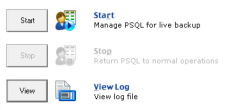
Figure 3-2 Initial Backup Agent Dialog
To manage your PSQL files for live backup, see Turning Backup Agent (GUI) ON.
1
The Backup Agent dialog appears.
To manage your PSQL files for live backup, refer to the next section, Turning Backup Agent (GUI) ON.
Turning Backup Agent (GUI) ON
1
From the Backup Agent initial dialog, click Start to turn the utility on and begin managing your PSQL databases for live backup.
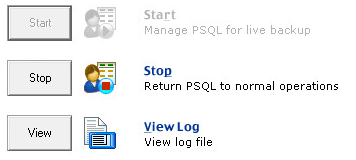
Once you have turned Backup Agent on, the utility displays the following.
Figure 3-3 Backup Agent ON
Backup Agent is now on and managing your PSQL databases for live backup.
Turning Backup Agent (GUI) OFF
1
From the Backup Agent on dialog (shown in Figure 3-3), click Stop to turn the utility off and return to normal operations.
When you first select Stop, the following message appears in the status bar at the bottom of the window:
Stopping continuous operations, rolling in changes.
2
Backup Agent is now off and has returned to normal operations.
Viewing the Backup Agent (GUI) Log File
1
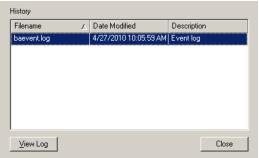
Click View Log to view the available Backup Agent log files.
The Backup Agent Log Viewer dialog appears.
Figure 3-4 Backup Agent Log Viewer
2
Click Close to exit the Backup Agent Log Viewer window.
You can view a specific log file by clicking View Log.
Displaying Backup Agent (GUI) Online Help
In the Backup Agent dialog, click the Help button with the question mark in the upper right corner of the dialog.
Closing the Backup Agent (GUI) Utility
1
Click the Backup Agent program icon in the upper left corner of the screen and in the menu select Close.
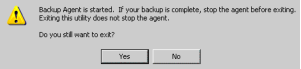
If you attempt to close the utility during an active backup session or before you have stopped the agent, the following message appears.
This message explains that the agent is currently on.
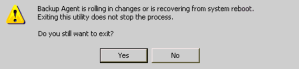
If you attempt to close the utility during a system reboot or when Backup Agent is rolling in changes, the following message appears.
2
If you are certain you want to exit the utility, click Yes. If you want to return to the interface to stop the agent, click No.
Tip Closing this utility interface does not stop the agent.
If you close this interface without stopping the agent, you could accidently leave the agent on, causing extremely large delta files to be created and compromising the integrity of your current backup.
The current size limit for delta files is 4 GB, but significant performance decrease could be noticed if the delta file reaches a size of 2 GB or greater. If your delta file reaches the 4 GB limit, you will receive a return status code of 132 - File Full.
Caution It is important that you stop the agent when your backup process has completed to avoid extremely large delta files that could compromise system performance and data integrity.