Creates a single string by joining two or more individual strings.
Script
(For two strings)operand1 & operand2
Inputs
(For two strings)operand1 – A string value.operand2 – A string value.
Returned Value
A string which is a result of concatenation of two or more individual strings.
Remarks
The default number of strings that you can concatenate is two. To increase the number of strings do the following:1.Click the icon to open the configuration box.2.Drag and drop the Item block to increase the number of items that you can join.This will allow you to concatenate more than two strings at a time.3.Click the icon again to close the configuration box.
Examples
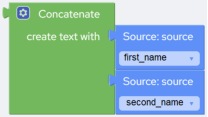
The following example returns a string (full_name) after concatenating two string fields “first_name” and “second_name”:Script:@first_name & @second_name
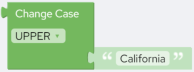
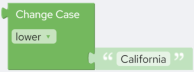
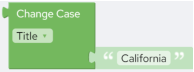
Converts the input string to UPPER, lower, or Title case based on the option that you select from the drop-down: • UPPER – Converts the input string to UPPER case. • lower – Converts the input string to lower case. • Title – Converts the input string to Title case.
Script
Upper(parameter)Lower(parameter)Proper(parameter)
Inputs
A string.
Returned Value
An UPPER, lower, or Title case string.
Examples
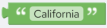
The following example returns “CALIFORNIA”.Script:Upper("California")The following example returns “california”.Script:Lower("California")The following example returns “California”.Script:Proper("California")
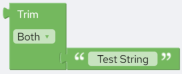
Removes spaces from the beginning, end or both sides of a string, based on the option that you select from the drop-down: • Both – Removes spaces from both sides of the string. • Left – Removes spaces from the beginning of the string. • Right – Removes spaces from the end of the string.
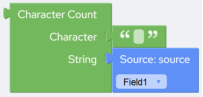
Counts the occurrences of a particular character in a string.
Script
CharCount(character, string)
Inputs
character - The character to look for and count. This is case-sensitive. Hence, if the specified character is in lower case, then the count will be of lowercase character.string - The string where to search.
Returned Value
An integer that represents the number of occurrences of a character in a string.
Examples
This example returns the number of spaces in the first source field. The name "John Thompson Reynolds" would return 2.Script:CharCount(" ",@Field1)
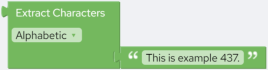
Extracts characters of a specified type from a string.
Script
Extract(string, charType)
Inputs
string – The string to extract from.charType – The type of character that you want to extract. You can select from “Alphabetic”, “Numeric” and “Alphanumeric”.
Returned Value
charType is “Alphabetic” - All alphabetic characters from the specified string.charType is “Numeric” - All numeric characters from the specified string.charType is “Alphanumeric” - All alphanumeric characters from the specified string.
Examples
This example returns “Thisisexample”, “437”, and “Thisisexample437” when you select “Alphabetical”, “Numeric”, and “Alphanumeric” respectively:Script:Extract("This is example 437.","a") Returns: Thisisexample``Extract("This is example 437.","n") Returns: 437``Extract("This is example 437.","an") Returns: Thisisexample437
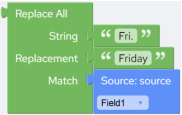
Replaces every occurrence of a specific “String” with the “Replacement” string in the specified search string.
Script
Replace(string, replacement, match)
Inputs
string – The string where to search.replacement – The replacement string.match – The matching pastern (the string to be searched).
Returned Value
A string.
Remarks
Replace All recognizes all special characters in the “match” parameter, but they must be preceded by the escape character backslash “\”. For example if you want to find and replace parentheses specify “(”.
Examples
The following example replaces every occurrence of "Fri." with "Friday" in the “field1” field:Script:Replace(@Field1,"Friday","Fri.")
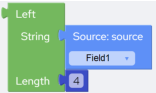
Extracts the specified number of characters from the beginning of a given string.
Script
Left(string,length)
Inputs
string – The string to extract from.length– The number of characters to extract. Must be a positive number.
Returned Value
Returns a string.
Examples
The following example returns four characters from “Field1” starting from the beginning. For example if “Field1” is “44060-1930” then the returned value is “4406”.Script:Left(@Field1,4)
Extracts the specified number of characters from the end of a given string.
Script
Right(string,length)
Inputs
string –The string to extract from.length – The number of characters to extract. Must be a positive number.
Returned Value
Returns a string.
Examples
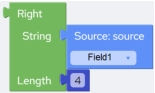
The following example returns four characters from “Field1” starting from the end. For example if “Field1” is “44060-1930” then the returned value is “1930”.Script:Right(@Field1,4)
Extracts the specified number of characters from a given string, starting from a specific position.
Script
Mid(string,start,length)
Inputs
string – The string to extract from.start – The start position. The first position in the string is 1.length – The number of characters to extract. Must be a positive number.
Returned Value
Returns a string.
Examples
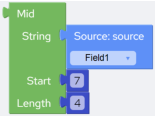
The following example returns four characters from “Field1” starting from seventh position. For example if “Field1” is “44060-1930” then the returned value is “1930”.Script:Mid(@Field1,7,4)
 Script:
 Script:
 Script:
 Script:
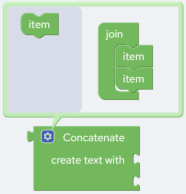 The default number of strings that you can concatenate is two. To increase the number of strings do the following:1.Click the
  icon to open the configuration box.2.Drag and drop the Item block to increase the number of items that you can join.This will allow you to concatenate more than two strings at a time.3.Click the
  icon again to close the configuration box.
 Script:
 Script:
 Script:
 Script:
 Script:
 Script:
 Script:
 Script:
 Script:
 Script:
 Script:
 Script:
 Script: