Write I/O Operators
The DataFlow operator library includes several pre-built Input/Output operators. This section covers the Write operators and provides details on how to use them. For more information, refer to the following topics:
WriteAvro Operator
The WriteAvro operator writes a stream of records in Apache Avro format. Avro is a commonly used binary format offering data compression and the ability to be parsed in parallel. The writer must provide an encoding schema which is serialized with the data, providing the reader with sufficient metadata to decode it.
The operator can be used to write data with a predefined schema or, if one is not provided, generate a schema automatically. When appending to an existing file, the schema encoded in the target is used, ignoring any that were set on the operator itself.
Input fields are mapped to fields in the output schema by name. Any input fields not mapped to an output field will be omitted from the output. Any output fields not mapped to an input field will be null-valued; if this is the case and the field schema does not allow null values—that is, it is not a UNION involving the NULL schema type, the writer will raise an error.
Input mappings must be to a compatible Avro schema type. An error will be raised if a field has an incompatible type. Furthermore, if a field schema does not allow null values, but the source field takes on a null value during execution—the writer will fail with an error. Valid mappings are described in the following table:
Target Avro Type | Valid DataFlow Types |
BOOLEAN | BOOLEAN |
BYTES | BINARY |
FIXED | BINARY; values will be checked at execution to ensure the correct length, failing if they are not |
DOUBLE | NUMERIC (with possible loss of precision), DOUBLE, FLOAT, LONG, INT |
FLOAT | FLOAT, LONG, INT |
LONG | LONG, INT |
INT | INT |
STRING | STRING |
ENUM | STRING; values will be checked at execution to ensure they are valid symbols, failing if they are not |
The remaining Avro schema types are handled as follows:
• RECORD can only be used as the top-level schema provided to the writer; nested records are not allowed. However, special record types representing the DataFlow DATE, TIME, and TIMESTAMP times are used in mapping generated schemas.
• UNION can be used only if one of the component schemas has a valid mapping.
• ARRAY and MAP are unsupported.
When no schema is provided, either from the target or on the operator, one will be generated based on the input data. The resulting schema will have the same field names and ordering as the input record.
Because DataFlow allows a greater range of field identifiers than Avro, a cleansing process must be applied to field names when generating a schema so that the resulting fields are valid. Names are cleansed by replacing any characters which are not alphanumeric or underscore ('_') with the underscore character. If the resulting name does not start with an underscore or alphabetic character, an underscore is prepended to the name. For example, a field named "field#1" is mapped to "field_1", a field named "#1 field" to "_1_field", and a field named "1st field" to "_1st_field". Should the cleansing process yield the same name for two different fields, schema generation will procude an error.
As all DataFlow values are nullable, the generated schema for each field is always a UNION involving NULL plus one other type as indicated by the source field type:
• DOUBLE, FLOAT, LONG, and INT fields are mapped to the primitive Avro types of the same name.
• STRING fields are mapped differently depending on whether they have a FieldDomain associated with them. If they have no domain, they are mapped to the STRING primitive type. If they have a domain, they are mapped to an Avro ENUM type with symbols matching the valid domain.
• BINARY fields are mapped to the BYTES primitive type.
• NUMERIC fields are mapped to the DOUBLE primitive type, with possible loss of precision.
• CHAR fields are mapped to the STRING primitive type.
• DATE fields are mapped to a nested RECORD type consisting of a single LONG field named epochDays.
• TIME fields are mapped to a nested RECORD type consisting of a single INT field named dayMillis.
• TIMESTAMP fields are mapped to a nested RECORD type consisting of three fields: a LONG field named epochSecs, an INT field named subsecNanos, and another INT field named offsetSecs.
As with all file-based write operators, the WriteAvro operator will treat its sink as a directory by default. A file-per-application data stream will be output in this case. This can be overridden using the writeSingleSink property.
When writing Avro data, the metadata containing information about the ordering and partitioning of the data may optionally be saved with the data. This can provide a performance improvement when reading the data later since the data may not need to be re-sorted or partitioned again to ensure it meets various requirements of the graph.
Code Examples
The following code example demonstrates using the WriteAvro operator to write a set of data files, generating a default schema.
Using the WriteAvro operator in Java
// Construct the writer with the path where the results are to be written.
// Use OVERWRITE mode indicating the output file should be overwritten if it exists already.
WriteAvro writer = graph.add(
new WriteAvro("results/test-ratings", WriteMode.OVERWRITE));
// Connect the output of the reader to the input of the writer
graph.connect(operator.getOutput(), writer.getInput());
// Use OVERWRITE mode indicating the output file should be overwritten if it exists already.
WriteAvro writer = graph.add(
new WriteAvro("results/test-ratings", WriteMode.OVERWRITE));
// Connect the output of the reader to the input of the writer
graph.connect(operator.getOutput(), writer.getInput());
The following example demonstrates using the operator in RushScript, providing the schema as a file (ratings.avrs) containing the JSON serialization of an Avro Schema object.
Using the WriteAvro operator in RushScript
// Note that this operator doesn't return anything
dr.writeAvro(data, {target:'results/test-ratings', mode:'OVERWRITE', schema:'ratings.avrs'});
dr.writeAvro(data, {target:'results/test-ratings', mode:'OVERWRITE', schema:'ratings.avrs'});
Properties
The WriteAvro operator supports the following properties:
Name | Type | Description |
compression | The compression method used when writing the Avro file. Default: NONE. | |
formatOptions | The formatting options used by the reader. This sets all format options at once. | |
mode | Determines how the writer should handle an existing target. | |
saveMetadata | boolean | Whether the writer should save metadata information about the ordering and distribution of the data. Default: false. |
schema | String or org.apache.avro.Schema | The schema to use when writing the Avro file. If a String is provided, it is interpreted as the name of a file containing a JSON serialization of the Schema. |
target | ByteSink, Path, or String | The sink to write. Path and String parameters are converted to sinks. If the writer is parallelized, this is interpreted as a directory in which each partition will write a fragment of the entire input stream. Otherwise, it is interpreted as the file to write. |
writeBuffer | int | The size of the I/O buffer, in bytes, to use for writes. Default: 64K. |
writeSingleSink | boolean | Whether the writer should produce a single output file or multiple ones. By default, an output file will be produced for each partition if the target sink supports this. |
writeOnClient | boolean | Determines whether writes are performed by the local client or in the cluster. This option also disables the parallelism during the write, producing a merge of the data on the local client. By default, writes are performed in the cluster if executed in a distributed context. |
Ports
The WriteAvro operator provides a single input port.
Name | Type | Get method | Description |
input | getInput() | The input data to be written to the provided sink in delimited text format. |
WriteToJDBC Operator
In its simplest form the WriteToJDBC operator writes records from an input port to a target table in a database using a JDBC driver. Data from the input data source will be added to the target table using database insert statements. Constraints may be applied by the database.
Initial and final SQL statements can be provided. The initial statement is run before any input data is handled. The final statement is executed after all input data has been processed.
The syntax of the supported SQL varies from database to database. Using standard SQL is generally a good practice to prevent errors when switching from one database to another.
The JDBC driver for the database being used must be in the Java classpath of the application using this operator. Databases generally provide a jar file that contains the JDBC driver and its dependencies.
Note that the WriteToJDBC operator operates in parallel by default. Each parallel instance will open a separate connection to the target database. To limit the number of database connections used by this operator, tune down the operator parallelism level.
• Within Java, create an OperatorSettings instance with the maximum parallelism level set to the wanted level. Pass the operator settings instance to the add() method of the composition context within which the operator is being added. See the code example below.
• Within RushScript, set the maxParallelism level property within the property settings of the operator instance. See the code example below.
To read from database tables using JDBC, see ReadFromJDBC Operator.
Code Examples
The following example reads data from a local file and writes the data into a table in MySQL.
Using the WriteToJDBC Operator in Java to append data to a table
// Create an operator settings specifying the maximum number of parallel instances.
// This is optional. It limits the number of database connections made.
OperatorSettings settings = OperatorSettings.MAX_PARALLELISM(8);
// Create the JDBC writer
WriteToJDBC writer = graph.add(new WriteToJDBC(), settings);
writer.setDriverName("com.mysql.jdbc.Driver");
writer.setUrl("jdbc:mysql://dbserver:3306/test");
writer.setUser("test");
writer.setPassword("test");
// Create mapping to database columns
Map<String, String> mappings= new LinkedHashMap<String, String>();
mappings.put("r_user", "user");
mappings.put("r_movieid", "movieid");
mappings.put("r_rating", "rating");
mappings.put("r_timestamp", "timestamp");
writer.setRenameMapping(mappings);
// Have to specify the table name using the JDBC writer
writer.setTableName("ratings");
// Set the SQL statement use to initialize the target table (as needed).
writer.setInitializeTableSQL(
"create table if not exists ratings (r_user integer, r_movieid integer, r_rating integer, r_timestamp varchar(20))");
writer.setSqlWarningLimit(20);
// This is optional. It limits the number of database connections made.
OperatorSettings settings = OperatorSettings.MAX_PARALLELISM(8);
// Create the JDBC writer
WriteToJDBC writer = graph.add(new WriteToJDBC(), settings);
writer.setDriverName("com.mysql.jdbc.Driver");
writer.setUrl("jdbc:mysql://dbserver:3306/test");
writer.setUser("test");
writer.setPassword("test");
// Create mapping to database columns
Map<String, String> mappings= new LinkedHashMap<String, String>();
mappings.put("r_user", "user");
mappings.put("r_movieid", "movieid");
mappings.put("r_rating", "rating");
mappings.put("r_timestamp", "timestamp");
writer.setRenameMapping(mappings);
// Have to specify the table name using the JDBC writer
writer.setTableName("ratings");
// Set the SQL statement use to initialize the target table (as needed).
writer.setInitializeTableSQL(
"create table if not exists ratings (r_user integer, r_movieid integer, r_rating integer, r_timestamp varchar(20))");
writer.setSqlWarningLimit(20);
Notes on the code example:
• The target table name is specified. When using WriteToJDBC the table name property is required.
• The SQL statement used to initialize the target table is specified. The SQL syntax may vary by database vendor.
Using the WriteToJDBC Operator in RushScript to append data to a table
// The SQL statement used to initialize the table
var initSQL = 'create table if not exists ratings (r_user integer, r_movieid integer, r_rating integer, r_timestamp varchar(20))';
// The database field remapping to use
var mapping = {
"r_user":"user",
"r_movieid":"movieid",
"r_rating":"rating",
"r_timestamp":"timestamp"
};
// Create the write to JDBC operator and set properties
dr.writeToJDBC(data, {
driverName:'com.mysql.jdbc.Driver',
url:'jdbc:mysql://dbserver:3306/test',
user:'test',
password:'test',
tableName:'ratings',
initializeTableSQL:initSQL,
renameMapping:mapping,
sqlWarningLimit:20},
maxParallelism:8); // optionally set the max number of parallel instances wanted
var initSQL = 'create table if not exists ratings (r_user integer, r_movieid integer, r_rating integer, r_timestamp varchar(20))';
// The database field remapping to use
var mapping = {
"r_user":"user",
"r_movieid":"movieid",
"r_rating":"rating",
"r_timestamp":"timestamp"
};
// Create the write to JDBC operator and set properties
dr.writeToJDBC(data, {
driverName:'com.mysql.jdbc.Driver',
url:'jdbc:mysql://dbserver:3306/test',
user:'test',
password:'test',
tableName:'ratings',
initializeTableSQL:initSQL,
renameMapping:mapping,
sqlWarningLimit:20},
maxParallelism:8); // optionally set the max number of parallel instances wanted
Properties
The WriteToJDBC operator supports the following properties.
Name | Type | Description |
|---|---|---|
commitInterval | int | The commit interval used by the JDBC driver. This is the number of operations to execute between commit points. Generally a larger commit interval provides better performance. |
connectionFactory | The connection factory to use for acquiring connections. A default implementation is provided. A specialized factory can be provided as needed. | |
driverName | String | The class name of the JDBC driver to use, for example: "sun.jdbc.odbc.JdbcOdbcDriver". |
errorAction | The action to take if a SQL error occurs while reading data from the database. | |
finalizeTableSQL | String | The SQL statement to execute after processing all the records. For example, this could be used to execute a SQL CREATE INDEX statement. |
initializeTableSQL | String | The SQL statement to execute before processing any records. Usually contains a CREATE TABLE SQL statement to recreate the table. |
isolationLevel | int | The isolation level to use for the transactions. Reference the JavaDoc for the java.sql.Connection.setTransactionIsolation method for isolation level explanations. |
keyNames | String[] | The field names (JDBC column names) to use as keys. |
password | String | The password for connecting to the database. |
renameMapping | Map<String,String> | A map used to convert flow names to table column names. This should be an ordered (that is, LinkedHashMap) mapping of names. The keys in the map represent the original names in the record port. The values in the map represent column names in the table. Any fields not included in the mapping will be dropped. |
sqlWarningLimit | int | The maximum number of warnings regarding SQL errors that an operator can emit. This property is only used if the errorAction property is set to ErrorAction.WARN. |
tableName | String | The name of the database table to write. |
url | String | The URL specifying the instance of the database to connect with. See the documentation for the database for formatting information. |
user | String | The user name for connecting to the database. |
Ports
The WriteToJDBC operator provides a single input port.
Name | Type | Get method | Description |
input | getInput() | The input data to be written to the configured database. |
BinaryWriter Operator
The BinaryWriter operator writes raw binary data to a filesystem—either single file or into multiple files. It writes the arbitrary data file as long as the original source filename is known.
The name of the file to be written must be provided to the writer including the original extension if applicable and the field that contains the raw binary data. If writing multiple files, a folder must be provided and the multiple property must be enabled. Additionally, the filename field must be specified when writing multiple files.
Using the BinaryWriter in Java for Multiple files
// Construct the writer with the path where the results are to be written.
BinaryWriter writer = graph.add(new BinaryWriter("results/files", WriteMode.OVERWRITE));
//Field name containing the raw binary data
writer.setBinaryField("data");
//Name of the field containing the output filenames to use when
//extracting the data.
writer.setFilenameField("fileName");
//Whether the data is written as a single file or multiple files.
writer.setMultiple(true);
Using the BinaryWriter in Java for Single file
BinaryWriter writer = graph.add(new BinaryWriter("results/ReadMe.txt", WriteMode.OVERWRITE));
writer.setBinaryField("data");
writer.setFilenameField(null);
writer.setMultiple(false);
Using the BinaryWriter in RushScript
// Rushscript for extracting multiple files
dr.binaryWriter(data, {target:'results/files',mode:WriteMode.OVERWRITE,multiple:(multiple=="true"),binaryField:"id",filenameField:"fileName"});
The following image shows the target for the sample application.

Properties
The BinaryWriter operator supports the following properties.
Name | Type | Description |
|---|---|---|
binaryField | String | The name of the field containing the raw binary. |
filenameField | String | The name of the field containing the output filenames to use when extracting the data. |
multiple | Boolean | Indicates whether the data is written as a single file or multiple files. |
Ports
The BinaryWriter operator provides a single input port.
Name | Type | Get Method | Description |
|---|---|---|---|
input | RecordPort | getInput() | The raw binary input data to be written to the provided sink. |
DeleteFromJDBC Operator
The DeleteFromJDBC operator deletes rows from a target table using the records from an input port to determine which rows to delete. When deleting rows the key fields must be specified in the operator properties. The key field values will be used within the generated database delete statement to determine which rows qualify for deletion.
This operator provides an output port that will include the data used by the delete operation and an additional column containing the status codes returned by the database for each delete statement.
Initial and final SQL statements can be provided. The initial statement is run before any input data is handled. The final statement is executed after all input data has been processed.
The syntax of the supported SQL varies from database to database. Using standard SQL is generally a good practice to prevent errors when switching from one database to another.
The JDBC driver for the database being used must be in the Java classpath of the application using this operator. Databases generally provide a jar file that contains the JDBC driver and its dependencies.
Note that the DeleteFromJDBC operator operates in parallel by default. Each parallel instance will open a separate connection to the target database. To limit the number of database connections used by this operator, tune down the operator parallelism level.
• Within Java, create an OperatorSettings instance with the maximum parallelism level set to the desired level. Pass the operator settings instance to the add() method of the composition context within which the operator is being added.
• Within RushScript, set the maxParallelism level property within the property settings of the operator instance.
Code Examples
The following example is used to delete rows from a database table. The input data to the operator must contain the key values required to remove data from the target table. This example also demonstrates collecting the output so that the status codes can be recorded.
Using the DeleteFromJDBC operator in Java to delete rows from a table
import static com.pervasive.datarush.types.TokenTypeConstant.INT;
import static com.pervasive.datarush.types.TokenTypeConstant.STRING;
import static com.pervasive.datarush.types.TokenTypeConstant.record;
import com.pervasive.datarush.graphs.LogicalGraph;
import com.pervasive.datarush.graphs.LogicalGraphFactory;
import com.pervasive.datarush.operators.io.jdbc.OutputMode;
import com.pervasive.datarush.operators.io.jdbc.DeleteFromJDBC;
import com.pervasive.datarush.operators.io.textfile.ReadDelimitedText;
import com.pervasive.datarush.schema.TextRecord;
import com.pervasive.datarush.types.RecordTokenType;
public class WriteMySQL {
public static void main(String[] args) {
// Create an empty logical graph
LogicalGraph graph = LogicalGraphFactory.newLogicalGraph("WriteDelete");
// Create a delimited text reader for the "ratings.txt" file
ReadDelimitedText reader = graph.add(new ReadDelimitedText("data/ratings.txt"));
reader.setFieldSeparator("::");
reader.setHeader(true);
RecordTokenType ratingsType = record(INT("r_user"), INT("r_movieid"), INT("r_rating"), STRING("r_timestamp"));
reader.setSchema(TextRecord.convert(ratingsType));
// Create JDBC writer
DeleteFromJDBC writer = graph.add(new DeleteFromJDBC());
writer.setDriverName("com.mysql.jdbc.Driver");
writer.setUrl("jdbc:mysql://dbserver:3306/test");
writer.setUser("root");
writer.setPassword("localadmin");
writer.setTableName("ratings");
// You have to specify the key field names.
writer.setKeyNames(new String[] {"r_user"});
writer.setSqlWarningLimit(20);
// Create a delimited text writer to collect the status codes
WriteDelimitedText logger = app.add(new WriteDelimitedText("ratings_delete_status.txt", WriteMode.OVERWRITE));
logger.setWriteSingleSink(true);
logger.setHeader(true);
// Connect operators
graph.connect(reader.getOutput(), writer.getInput());
graph.connect(writer.getOutput(), logger.getInput());
// Compile and run the graph
graph.run();
}
}
import static com.pervasive.datarush.types.TokenTypeConstant.STRING;
import static com.pervasive.datarush.types.TokenTypeConstant.record;
import com.pervasive.datarush.graphs.LogicalGraph;
import com.pervasive.datarush.graphs.LogicalGraphFactory;
import com.pervasive.datarush.operators.io.jdbc.OutputMode;
import com.pervasive.datarush.operators.io.jdbc.DeleteFromJDBC;
import com.pervasive.datarush.operators.io.textfile.ReadDelimitedText;
import com.pervasive.datarush.schema.TextRecord;
import com.pervasive.datarush.types.RecordTokenType;
public class WriteMySQL {
public static void main(String[] args) {
// Create an empty logical graph
LogicalGraph graph = LogicalGraphFactory.newLogicalGraph("WriteDelete");
// Create a delimited text reader for the "ratings.txt" file
ReadDelimitedText reader = graph.add(new ReadDelimitedText("data/ratings.txt"));
reader.setFieldSeparator("::");
reader.setHeader(true);
RecordTokenType ratingsType = record(INT("r_user"), INT("r_movieid"), INT("r_rating"), STRING("r_timestamp"));
reader.setSchema(TextRecord.convert(ratingsType));
// Create JDBC writer
DeleteFromJDBC writer = graph.add(new DeleteFromJDBC());
writer.setDriverName("com.mysql.jdbc.Driver");
writer.setUrl("jdbc:mysql://dbserver:3306/test");
writer.setUser("root");
writer.setPassword("localadmin");
writer.setTableName("ratings");
// You have to specify the key field names.
writer.setKeyNames(new String[] {"r_user"});
writer.setSqlWarningLimit(20);
// Create a delimited text writer to collect the status codes
WriteDelimitedText logger = app.add(new WriteDelimitedText("ratings_delete_status.txt", WriteMode.OVERWRITE));
logger.setWriteSingleSink(true);
logger.setHeader(true);
// Connect operators
graph.connect(reader.getOutput(), writer.getInput());
graph.connect(writer.getOutput(), logger.getInput());
// Compile and run the graph
graph.run();
}
}
Using the DeleteFromJDBC Operator in RushScript to delete data from a table
// Create the delete from JDBC operator and set properties
dr.deleteFromJDBC(data, {
driverName:'com.mysql.jdbc.Driver',
url:'jdbc:mysql://dbserver:3306/test',
user:'root',
password:'localadmin',
tableName:'ratings',
keyNames:["r_user"],
sqlWarningLimit:20},
maxParallelism:8); // optionally set the max number of parallel instances wanted
dr.deleteFromJDBC(data, {
driverName:'com.mysql.jdbc.Driver',
url:'jdbc:mysql://dbserver:3306/test',
user:'root',
password:'localadmin',
tableName:'ratings',
keyNames:["r_user"],
sqlWarningLimit:20},
maxParallelism:8); // optionally set the max number of parallel instances wanted
Properties
The DeleteFromJDBC operator supports the following properties.
Name | Type | Description |
|---|---|---|
commitInterval | int | The commit interval used by the JDBC driver. This is the number of operations to execute between commit points. Generally, a larger commit interval provides better performance. |
connectionFactory | The connection factory to use for acquiring connections. A default implementation is provided. A specialized factory can be provided as needed. | |
driverName | String | The class name of the JDBC driver to use, for example: "sun.jdbc.odbc.JdbcOdbcDriver". |
errorAction | The action to take if a SQL error occurs while reading data from the database. | |
finalizeTableSQL | String | The SQL statement to execute after processing all the records. For example, this could be used to execute a SQL "CREATE INDEX" statement. |
initializeTableSQL | String | The SQL statement to execute before processing any records. |
isolationLevel | int | The isolation level to use for the transactions. Reference the JavaDoc for the java.sql.Connection.setTransactionIsolation method for isolation level explanations. |
keyNames | String[] | The field names (JDBC column names) to use as keys. |
password | String | The password for connecting to the database. |
renameMapping | Map<String,String> | A map used to convert flow names to table column names. This should be an ordered (that is, LinkedHashMap) mapping of names. The keys in the map represent the original names in the record port. The values in the map represent column names in the table. Any fields not included in the mapping will be dropped. |
statusField | String | Sets the name of the field that will contain the updates statuses. Default: "DeleteStatus". |
sqlWarningLimit | int | The maximum number of warnings regarding SQL errors that an operator can emit. This property is only used if the errorAction property is set to ErrorAction.WARN. |
tableName | String | The name of the database table to write. |
url | String | The URL specifying the instance of the database to connect with. See the documentation for the database for formatting information. |
user | String | The user name for connecting to the database. |
Ports
The DeleteFromJDBC operator provides a single input port.
Name | Type | Get method | Description |
input | getInput() | Data identifying the records to delete from the target table. |
The DeleteFromJDBC operator provides a single output port.
Name | Type | Get method | Description |
output | getOutput() | The input data used and the returned status codes. |
UpdateInJDBC Operator
The UpdateInJDBC operator updates rows in a target table using records from an input port to determine which columns to update. When updating rows the key fields must be specified in the operator properties. The key field values will be used within the generated database update statement to determine which rows qualify for an update. Additionally the update fields may be specified in the operator properties. If the fields to update are not set all non-key fields will be used for the update.
This operator provides an output port that will include the data used by the update operation and an additional column containing the status codes returned be the database for each update statement.
Initial and final SQL statements can be provided. The initial statement is run before any input data is handled. The final statement is executed after all input data has been processed.
The syntax of the supported SQL varies from database to database. Using standard SQL is generally a good practice to prevent errors when switching from one database to another.
The JDBC driver for the database being used must be in the Java classpath of the application using this operator. Databases generally provide a .jar file that contains the JDBC driver and its dependencies.
Note that the UpdateInJDBC operator operates in parallel by default. Each parallel instance will open a separate connection to the target database. To limit the number of database connections used by this operator, tune down the operator parallelism level.
• Within Java, create an OperatorSettings instance with the maximum parallelism level set to the desired level. Pass the operator settings instance to the add() method of the composition context within which the operator is being added.
• Within RushScript, set the maxParallelism level property within the property settings of the operator instance.
Code Examples
The following example shows how to use the input data of the UpdateInJDBC operator to update database rows. The "r_user" and "r_movieid" fields from the ratings data are used as keys. The rating value is updated. This example also demonstrates collecting the output so the status codes can be recorded.
Using the UpdateInJDBC operator to update database rows
import static com.pervasive.datarush.types.TokenTypeConstant.INT;
import static com.pervasive.datarush.types.TokenTypeConstant.STRING;
import static com.pervasive.datarush.types.TokenTypeConstant.record;
import com.pervasive.datarush.graphs.LogicalGraph;
import com.pervasive.datarush.graphs.LogicalGraphFactory;
import com.pervasive.datarush.operators.io.jdbc.OutputMode;
import com.pervasive.datarush.operators.io.jdbc.UpdateInJDBC;
import com.pervasive.datarush.operators.io.textfile.ReadDelimitedText;
import com.pervasive.datarush.operators.record.SelectFields;
import com.pervasive.datarush.schema.TextRecord;
import com.pervasive.datarush.types.RecordTokenType;
public class UpdateMySQL {
public static void main(String[] args) {
// Create an empty logical graph
LogicalGraph graph = LogicalGraphFactory.newLogicalGraph("WriteMySQL");
// Create a delimited text reader for the "ratings.txt" file
ReadDelimitedText reader = graph.add(new ReadDelimitedText("data/ratings.txt"));
reader.setFieldSeparator("::");
reader.setHeader(true);
RecordTokenType ratingsType = record(INT("r_user"), INT("r_movieid"), INT("r_rating"), STRING("r_timestamp"));
reader.setSchema(TextRecord.convert(ratingsType));
// Create JDBC writer
UpdateInJDBC writer = graph.add(new UpdateInJDBC());
writer.setDriverName("com.mysql.jdbc.Driver");
writer.setUrl("jdbc:mysql://dbserver:3306/test");
writer.setUser("root");
writer.setPassword("localadmin");
writer.setTableName("ratings");
// Specify the key fields names used as keys in the SQL update commands.
writer.setKeyNames(new String[] {"r_user", "r_movieid"});
writer.setSqlWarningLimit(20);
// Specify the name of the field that should be updated
writer.setUpdateFields(new String[] {"r_rating"});
// Create a delimited text writer to collect the status codes
WriteDelimitedText logger = app.add(new WriteDelimitedText("ratings_update_status.txt", WriteMode.OVERWRITE));
logger.setWriteSingleSink(true);
logger.setHeader(true);
// Connect operators
graph.connect(reader.getOutput(), writer.getInput());
graph.connect(writer.getOutput(), logger.getInput());
// Compile and run the graph
graph.run();
}
}
import static com.pervasive.datarush.types.TokenTypeConstant.STRING;
import static com.pervasive.datarush.types.TokenTypeConstant.record;
import com.pervasive.datarush.graphs.LogicalGraph;
import com.pervasive.datarush.graphs.LogicalGraphFactory;
import com.pervasive.datarush.operators.io.jdbc.OutputMode;
import com.pervasive.datarush.operators.io.jdbc.UpdateInJDBC;
import com.pervasive.datarush.operators.io.textfile.ReadDelimitedText;
import com.pervasive.datarush.operators.record.SelectFields;
import com.pervasive.datarush.schema.TextRecord;
import com.pervasive.datarush.types.RecordTokenType;
public class UpdateMySQL {
public static void main(String[] args) {
// Create an empty logical graph
LogicalGraph graph = LogicalGraphFactory.newLogicalGraph("WriteMySQL");
// Create a delimited text reader for the "ratings.txt" file
ReadDelimitedText reader = graph.add(new ReadDelimitedText("data/ratings.txt"));
reader.setFieldSeparator("::");
reader.setHeader(true);
RecordTokenType ratingsType = record(INT("r_user"), INT("r_movieid"), INT("r_rating"), STRING("r_timestamp"));
reader.setSchema(TextRecord.convert(ratingsType));
// Create JDBC writer
UpdateInJDBC writer = graph.add(new UpdateInJDBC());
writer.setDriverName("com.mysql.jdbc.Driver");
writer.setUrl("jdbc:mysql://dbserver:3306/test");
writer.setUser("root");
writer.setPassword("localadmin");
writer.setTableName("ratings");
// Specify the key fields names used as keys in the SQL update commands.
writer.setKeyNames(new String[] {"r_user", "r_movieid"});
writer.setSqlWarningLimit(20);
// Specify the name of the field that should be updated
writer.setUpdateFields(new String[] {"r_rating"});
// Create a delimited text writer to collect the status codes
WriteDelimitedText logger = app.add(new WriteDelimitedText("ratings_update_status.txt", WriteMode.OVERWRITE));
logger.setWriteSingleSink(true);
logger.setHeader(true);
// Connect operators
graph.connect(reader.getOutput(), writer.getInput());
graph.connect(writer.getOutput(), logger.getInput());
// Compile and run the graph
graph.run();
}
}
Using the UpdateInJDBC Operator in RushScript to update data in a table
// Create the update in JDBC operator and set properties
dr.updateInJDBC(data, {
driverName:'com.mysql.jdbc.Driver',
url:'jdbc:mysql://dbserver:3306/test',
user:'root',
password:'localadmin',
tableName:'ratings',
keyNames:["r_user", "r_movieid"],
updateFields:["r_rating"],
sqlWarningLimit:20},
maxParallelism:8); // optionally set the max number of parallel instances wanted
dr.updateInJDBC(data, {
driverName:'com.mysql.jdbc.Driver',
url:'jdbc:mysql://dbserver:3306/test',
user:'root',
password:'localadmin',
tableName:'ratings',
keyNames:["r_user", "r_movieid"],
updateFields:["r_rating"],
sqlWarningLimit:20},
maxParallelism:8); // optionally set the max number of parallel instances wanted
Properties
The UpdateInJDBC operator supports the following properties.
Name | Type | Description |
|---|---|---|
commitInterval | int | The commit interval used by the JDBC driver. This is the number of operations to execute between commit points. Generally, a larger commit interval provides better performance. |
connectionFactory | The connection factory to use for acquiring connections. A default implementation is provided. A specialized factory can be provided as needed. | |
driverName | String | The class name of the JDBC driver to use, for example: "sun.jdbc.odbc.JdbcOdbcDriver". |
errorAction | The action to take if a SQL error occurs while reading data from the database. | |
finalizeTableSQL | String | The SQL statement to execute after processing all the records. For example, this could be used to execute a SQL CREATE INDEX statement. |
initializeTableSQL | String | The SQL statement to execute before processing any records. |
isolationLevel | int | The isolation level to use for the transactions. See the JavaDoc for the java.sql.Connection.setTransactionIsolation method for isolation level explanations. |
keyNames | String[] | The field names (JDBC column names) to use as keys. |
password | String | The password for connecting to the database. |
renameMapping | Map<String,String> | A map used to convert flow names to table column names. This should be an ordered (that is, LinkedHashMap) mapping of names. The keys in the map represent the original names in the record port. The values in the map represent column names in the table. Any fields not included in the mapping will be dropped. |
statusField | String | Sets the name of the field that will contain the updates statuses. Default: "UpdateStatus". |
sqlWarningLimit | int | The maximum number of warnings regarding SQL errors that an operator can emit. This property is only used if the errorAction property is set to ErrorAction.WARN. |
tableName | String | The name of the database table to write. |
updateFields | String[] | The field names (JDBC column names) to use as update fields. |
url | String | The URL specifying the instance of the database to connect with. See the documentation for the database for formatting information. |
user | String | The user name for connecting to the database. |
Ports
The UpdateInJDBC operator provides a single input port.
Name | Type | Get method | Description |
input | getInput() | Data identifying the the updates to apply to the target table. |
The UpdateInJDBC operator provides a single output port.
Name | Type | Get method | Description |
output | getOutput() | The input data used and the returned status codes. |
WriteDelimitedText Operator
The WriteDelimitedText operator writes a stream of records as delimited text. The writer performs no reordering or filtering of the fields. If this is desired, the stream should be preprocessed with the appropriate operator.
Delimited text supports up to three distinct user-defined sequences within a record, used to identify field boundaries:
• A field separator: found between individual fields. By default this is a comma character.
• A field start delimiter: marking the beginning of a field value. By default this is the double quote character.
• A field end delimiter: marking the end of a field value. By default this is the double quote character.
The field separator cannot be empty. The start and end delimiters can be the same value. They can also both (but not individually) be empty, signifying the absence of field delimiters. The writer will always delimit fields, regardless of whether the values require it. Should a delimited field need to contain the end delimiter, it is escaped from its normal interpretation by duplicating it. For instance, the value ab""c will be formatted as "ab"c".
The writer accepts a RecordTextSchema to provide formatting information for fields, as well as header row information. It is not required to provide a schema; however, one can be generated from the input data type using default formatting based on the data type. The writer also supports a pluggable discovery mechanism for creating a schema based on the input type, should fine-grained dynamic control be required.
Any schema, supplied or discovered, must be compatible with the input to the reader. To be compatible, a schema must contain a field definition with an assignable type for each field named in the input. Fields present in the schema but not the input are permitted with the missing field assuming a null value.
Delimited text data may or may not have a header row. The header row is delimited as usual but contains the names of the fields in the data portion of the record. The writer will emit a header row if it should be present and the write is not appending to an existing file.
When writing delimited text data, the metadata containing information about the ordering and partitioning of the data may optionally be saved with the data. This can provide a performance improvement when reading the data later since the data may not need to be re-sorted or partitioned again to ensure it meets various requirements of the graph.
As with all file-based write operators, the WriteDelimitedText operator will treat its sink as a directory by default. A file-per-application data stream will be output in this case. This can be overridden using the writeSingleSink property.
See ReadDelimitedText Operator to read data in delimited text format.
Code Examples
The following code example demonstrates using the WriteDelimitedText operator to write a set of data files.
Using the WriteDelimitedText operator in Java
// Construct the writer with the path where the results are to be written.
// Use OVERWRITE mode indicating the output file should be overwritten if it exists already.
WriteDelimitedText writer = graph.add(
new WriteDelimitedText("results/test-ratings", WriteMode.OVERWRITE));
// No start/end field delimiter wanted
writer.setFieldDelimiter("");
// Output a header row at the beginning of the file with field names
writer.setHeader(true);
// Connect the output of the reader to the input of the writer
graph.connect(operator.getOutput(), writer.getInput());
// Use OVERWRITE mode indicating the output file should be overwritten if it exists already.
WriteDelimitedText writer = graph.add(
new WriteDelimitedText("results/test-ratings", WriteMode.OVERWRITE));
// No start/end field delimiter wanted
writer.setFieldDelimiter("");
// Output a header row at the beginning of the file with field names
writer.setHeader(true);
// Connect the output of the reader to the input of the writer
graph.connect(operator.getOutput(), writer.getInput());
Using the WriteDelimitedText operator in RushScript
// Note that this operator doesn't return anything
dr.writeDelimitedText(data, {target:'results/test-ratings', mode:'OVERWRITE', fieldDelimiter:'', header:true});
dr.writeDelimitedText(data, {target:'results/test-ratings', mode:'OVERWRITE', fieldDelimiter:'', header:true});
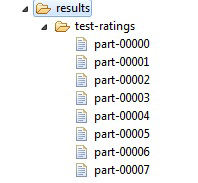
Note that the writeSingleSink property was not set. The property defaults to false. Running this application will result in multiple files being written into the target directory. The files will be named "part%n" where %n is replaced with the partition number. The number of files written will correspond to the parallelism configured for the DataFlow engine.
The partial screen shot below shows the results directory that contains the output of the sample application. Eight part files were written since the engine parallelism level was set to eight. Writing files in this manner is optimal, as the individual data streams can be written in parallel.
If for some reason the data is needed in a single file, enable the writeSingleSink property. The following code fragment amends the example above to add the setting of this property. The output will be a single file containing all of the resultant data. Performance will be adversely affected as the data must be gathered into a single stream for writing.
Using a single sink
// Create a delimited text writer
WriteDelimitedText writer = graph.add(new WriteDelimitedText("results/test-ratings.txt", WriteMode.OVERWRITE));
writer.setFieldDelimiter("");
writer.setHeader(true);
writer.setWriteSingleSink(true);
WriteDelimitedText writer = graph.add(new WriteDelimitedText("results/test-ratings.txt", WriteMode.OVERWRITE));
writer.setFieldDelimiter("");
writer.setHeader(true);
writer.setWriteSingleSink(true);
Properties
The WriteDelimitedText operator supports the following properties.
Name | Type | Description |
|---|---|---|
charset | Charset | The character set used by the data source. Default: ISO-8859-1. |
charsetName | String | The character set used by the data source by name. |
encodeBuffer | int | The size of the buffer, in bytes, used to encode data. By default, this will be automatically derived using the character set and read buffer size. |
encoding | Properties that control character set encoding. | |
errorAction | CodingErrorAction | The error action determines how to handle errors encoding the output data into the configured character set. The default action is to replace the faulty data with a replacement character. |
fieldDelimiter | String | Delimiter used to denote the boundaries of a data field. |
fieldEndDelimiter | String | Ending delimiter used to denote the boundaries of a data field. |
fieldSeparator | String | Delimiter used to define the boundary between data fields. |
fieldStartDelimiter | String | Starting delimiter used to denote the boundaries of a data field. |
formatOptions | The formatting options used by the reader. This sets all format options at once. | |
header | String | Whether to expect a header row in the source. The header row contains field names. |
lineComment | String | The character sequence indicating a line comment. Lines beginning with this sequence are ignored. |
mode | Determines how the writer should handle an existing target. | |
nullIndicator | String | Text value to substitute for null data values. Empty string by default. |
recordSeparator | String | Value to use as a record separator. |
replacement | String | Replacement string to use when encoding error policy is replacement. Default: '?' |
saveMetadata | boolean | Whether the writer should save metadata information about the ordering and distribution of the data. Default: false. |
schema | The record schema expected in the delimited text source. | |
target | ByteSink, Path, or String | The sink to write. Path and String parameters are converted to sinks. If the writer is parallelized, this is interpreted as a directory in which each partition will write a fragment of the entire input stream. Otherwise, it is interpreted as the file to write. |
writeBuffer | int | The size of the I/O buffer, in bytes, to use for writes. Default: 64K. |
writeSingleSink | boolean | Whether the writer should produce a single output file or multiple ones. By default, an output file will be produced for each partition, if the target sink supports this. |
writeOnClient | boolean | Determines whether writes are performed by the local client or in the cluster. This option also disables the parallelism during the write, producing a merge of the data on the local client. By default, writes are performed in the cluster, if executed in a distributed context. |
Ports
The WriteDelimitedText operator provides a single input port.
Name | Type | Get method | Description |
input | getInput() | The input data to be written to the provided sink in delimited text format. |
WriteFixedText Operator
The WriteFixedText operator writes a record dataflow as a text file of fixed-width records. The writer requires a schema (FixedWidthTextRecord) to determine how field values are positioned and formatted. Fields are mapped by name; all fields defined in the schema must be present in the input (and vice versa), although they need not be in the same order. The order of fields in the formatted record is determined by the order in the supplied schema. Records in the file are separated by a non-empty, user-defined character sequence.
The record schema can be manually constructed using the API provided, though this metadata is often persisted externally. Support for Pervasive Data Integrator structured schema descriptors (.schema files) is provided by the StructuredSchemaReader class.
See ReadFixedText Operator to read fixed-width text data.
Code Examples
The following example uses the WriteFixedText operator to write a file in fixed-width format.
Using the WriteFixedText operator in Java
// Define the schema for the account data. This schema can be used
// for reading and writing the account data.
FixedWidthTextRecord schema = new FixedWidthTextRecord(new TextConversionDefaults(StringConversion.NULLABLE_TRIMMED));
schema.defineField("accountNumber", new PaddedTextType(TextTypes.STRING, 9, ' ', Alignment.LEFT));
schema.defineField("name", new PaddedTextType(TextTypes.STRING, 21, ' ', Alignment.LEFT));
schema.defineField("companyName", new PaddedTextType(TextTypes.STRING, 31, ' ', Alignment.LEFT));
schema.defineField("address", new PaddedTextType(TextTypes.STRING, 35, ' ', Alignment.LEFT));
schema.defineField("city", new PaddedTextType(TextTypes.STRING, 16, ' ', Alignment.LEFT));
schema.defineField("state", new PaddedTextType(TextTypes.STRING, 2, ' ', Alignment.LEFT));
schema.defineField("zip", new PaddedTextType(TextTypes.STRING, 10, ' ', Alignment.LEFT));
schema.defineField("emailAddress", new PaddedTextType(TextTypes.STRING, 25, ' ', Alignment.LEFT));
schema.defineField("birthDate", new PaddedTextType(TextTypes.FORMATTED_DATE(new SimpleDateFormat("MM/dd/yyyy")), 10, ' ', Alignment.LEFT));
schema.defineField("accountCodes", new PaddedTextType(TextTypes.STRING, 11, ' ', Alignment.LEFT));
schema.defineField("standardPayment", new PaddedTextType(TextTypes.JAVA_DOUBLE, 6, ' ', Alignment.LEFT));
schema.defineField("payment", new PaddedTextType(TextTypes.JAVA_DOUBLE, 7, ' ', Alignment.LEFT));
schema.defineField("balance", new PaddedTextType(TextTypes.JAVA_DOUBLE, 6, ' ', Alignment.LEFT));
// Create fixed text writer
WriteFixedText writer = graph.add(new WriteFixedText("results/accounts-fixedwidth.txt", WriteMode.OVERWRITE));
writer.setSchema(schema);
writer.setWriteSingleSink(true);
// for reading and writing the account data.
FixedWidthTextRecord schema = new FixedWidthTextRecord(new TextConversionDefaults(StringConversion.NULLABLE_TRIMMED));
schema.defineField("accountNumber", new PaddedTextType(TextTypes.STRING, 9, ' ', Alignment.LEFT));
schema.defineField("name", new PaddedTextType(TextTypes.STRING, 21, ' ', Alignment.LEFT));
schema.defineField("companyName", new PaddedTextType(TextTypes.STRING, 31, ' ', Alignment.LEFT));
schema.defineField("address", new PaddedTextType(TextTypes.STRING, 35, ' ', Alignment.LEFT));
schema.defineField("city", new PaddedTextType(TextTypes.STRING, 16, ' ', Alignment.LEFT));
schema.defineField("state", new PaddedTextType(TextTypes.STRING, 2, ' ', Alignment.LEFT));
schema.defineField("zip", new PaddedTextType(TextTypes.STRING, 10, ' ', Alignment.LEFT));
schema.defineField("emailAddress", new PaddedTextType(TextTypes.STRING, 25, ' ', Alignment.LEFT));
schema.defineField("birthDate", new PaddedTextType(TextTypes.FORMATTED_DATE(new SimpleDateFormat("MM/dd/yyyy")), 10, ' ', Alignment.LEFT));
schema.defineField("accountCodes", new PaddedTextType(TextTypes.STRING, 11, ' ', Alignment.LEFT));
schema.defineField("standardPayment", new PaddedTextType(TextTypes.JAVA_DOUBLE, 6, ' ', Alignment.LEFT));
schema.defineField("payment", new PaddedTextType(TextTypes.JAVA_DOUBLE, 7, ' ', Alignment.LEFT));
schema.defineField("balance", new PaddedTextType(TextTypes.JAVA_DOUBLE, 6, ' ', Alignment.LEFT));
// Create fixed text writer
WriteFixedText writer = graph.add(new WriteFixedText("results/accounts-fixedwidth.txt", WriteMode.OVERWRITE));
writer.setSchema(schema);
writer.setWriteSingleSink(true);
Here is a fragment of the data output by the example WriteFixedText operator.
01-000667George P Schell Market Place Products 334 Hilltop Dr Mentor OH44060-1930warmst864@aol.com 02/28/1971XA 101.0 100.0 15.89
01-002423Marc S Brittan Madson & Huth Communication Co 5653 S Blackstone Avenue, #3E Chicago IL60637-4596mapper@tcent.net 06/30/1975BA 144.0 144.0 449.92
01-006063Stephanie A Jernigan La Salle Clinic 77565 Lorain Akron OH44325-4002dram@akron.net 11/02/1941EB|CB 126.0 126.0 262.98
01-010474Ernie Esser Town & Country Electric Inc. 56 Pricewater Waltham MA2453 hazel@bentley.net 12/15/1962JA|RB 127.0 127.0 271.75
01-010852Robert A Jacoby Saturn of Baton Rouge 4001 Lafayette Baton Rouge LA70803-4918din33@norl.com 12/22/1985ED|EA|RB|KA142.0 150.0 423.01
01-011625James C Felli Bemiss Corp. 23A Carolina Park Circle Spartanburg SC29303-9398cadair@gw.com 02/21/1940SB 151.0 155.0 515.41
01-018448Alan W Neebe Georgia State Credit Union PO Box 159 Demorest GA30535-1177delores@truett.com 01/31/1960MA|ED|SB 113.0 120.0 131.89
01-018595Alexander Gose Office Support Services 436 Green Mountain Circle New Paltz NY12561-0023dams@matrix.net 06/19/1940EC 147.0 147.0 477.09
01-002423Marc S Brittan Madson & Huth Communication Co 5653 S Blackstone Avenue, #3E Chicago IL60637-4596mapper@tcent.net 06/30/1975BA 144.0 144.0 449.92
01-006063Stephanie A Jernigan La Salle Clinic 77565 Lorain Akron OH44325-4002dram@akron.net 11/02/1941EB|CB 126.0 126.0 262.98
01-010474Ernie Esser Town & Country Electric Inc. 56 Pricewater Waltham MA2453 hazel@bentley.net 12/15/1962JA|RB 127.0 127.0 271.75
01-010852Robert A Jacoby Saturn of Baton Rouge 4001 Lafayette Baton Rouge LA70803-4918din33@norl.com 12/22/1985ED|EA|RB|KA142.0 150.0 423.01
01-011625James C Felli Bemiss Corp. 23A Carolina Park Circle Spartanburg SC29303-9398cadair@gw.com 02/21/1940SB 151.0 155.0 515.41
01-018448Alan W Neebe Georgia State Credit Union PO Box 159 Demorest GA30535-1177delores@truett.com 01/31/1960MA|ED|SB 113.0 120.0 131.89
01-018595Alexander Gose Office Support Services 436 Green Mountain Circle New Paltz NY12561-0023dams@matrix.net 06/19/1940EC 147.0 147.0 477.09
The following example demonstrates writing fixed-width data using RushScript.
Using the WriteFixedText operator in RushScript
var accountsFixedSchema = dr.schema({type:'FIXED'})
.nullable(true)
.trimmed(true)
.padChar(' ')
.alignment('LEFT')
.STRING("accountNumber", {size:9})
.STRING("clientName", {size:21})
.STRING("companyName", {size:31})
.STRING("streetAddress", {size:35})
.STRING("city", {size:16})
.STRING("state", {size:2})
.STRING("zip", {size:10})
.STRING("emailAddress", {size:25})
.DATE("birthDate", {pattern:'MM/dd/yyyy', size:10})
.STRING("accountCodes", {size:11})
.DOUBLE("standardPayment", {pattern:'0.00', size:6})
.DOUBLE("payment", {pattern:'0.00', size:7})
.DOUBLE("balance", {pattern:'0.00', size:6});
// Read fixed-width data data
dr.writeFixedText(
data,
{
target:'/path/to/file.txt',
mode:'OVERWRITE',
schema:accountsFixedSchema
});
.nullable(true)
.trimmed(true)
.padChar(' ')
.alignment('LEFT')
.STRING("accountNumber", {size:9})
.STRING("clientName", {size:21})
.STRING("companyName", {size:31})
.STRING("streetAddress", {size:35})
.STRING("city", {size:16})
.STRING("state", {size:2})
.STRING("zip", {size:10})
.STRING("emailAddress", {size:25})
.DATE("birthDate", {pattern:'MM/dd/yyyy', size:10})
.STRING("accountCodes", {size:11})
.DOUBLE("standardPayment", {pattern:'0.00', size:6})
.DOUBLE("payment", {pattern:'0.00', size:7})
.DOUBLE("balance", {pattern:'0.00', size:6});
// Read fixed-width data data
dr.writeFixedText(
data,
{
target:'/path/to/file.txt',
mode:'OVERWRITE',
schema:accountsFixedSchema
});
Properties
The WriteFixedText operator supports the following properties.
Name | Type | Description |
|---|---|---|
charset | Charset | The character set used by the data source. Default: ISO-8859-1. |
charsetName | String | The character set used by the data source by name. |
encodeBuffer | int | The size of the buffer, in bytes, used to encode data. By default, this will be automatically derived using the character set and read buffer size. |
encoding | Properties that control character set encoding. | |
errorAction | CodingErrorAction | The error action determines how to handle errors encoding the output data into the configured character set. The default action is to replace the faulty data with a replacement character. |
formatOptions | The formatting options used by the reader. This sets all format options at once. | |
mode | Determines how the writer should handle an existing target. | |
nullIndicator | String | Text value to substitute for null data values. Empty string by default. |
recordSeparator | String | Value to use as a record separator. |
replacement | String | Replacement string to use when encoding error policy is replacement. Defaul: '?' |
schema | The record schema expected in the delimited text source. | |
target | ByteSink, Path, or String | The sink to write. Path and String parameters are converted to sinks. If the writer is parallelized, this is interpreted as a directory in which each partition will write a fragment of the entire input stream. Otherwise, it is interpreted as the file to write. |
writeBuffer | int | The size of the I/O buffer, in bytes, to use for writes. Default: 64K. |
writeSingleSink | boolean | Whether the writer should produce a single output file or multiple ones. By default, an output file will be produced for each partition if the target sink supports this. |
writeOnClient | boolean | Determines whether writes are performed by the local client or in the cluster. This option also disables the parallelism during the write, producing a merge of the data on the local client. By default, writes are performed in the cluster if executed in a distributed context. |
Ports
The WriteFixedText operator provides a single input port.
Name | Type | Get method | Description |
input | getInput() | The input data to be written to the provided sink in fixed-width text format. |
WriteSink Operator
The WriteSink operator writes a stream of records to a data sink. The sink accepts a sequence of bytes that represent formatted records, identical in logical structure. The mapping between physical and logical structure is encapsulated in a format descriptor, which must be provided.
This operator is low level, providing a generalized model for reading files in a distributed fashion. Typically, WriteSink is not directly used in a graph. Instead, it is indirectly used through a composite operator such as one derived from AbstractWriter, providing a more appropriate interface to the end user.
Parallelized writes are supported by creating multiple output sinks from the original target, called fragments, each representing the portion of data on one partition. In the case of a write to a file system, this would result in a directory of files. To write in parallel the target must support the concept of fragmenting. If a target does not support fragmenting the write is forced to be non-parallel.
A port is provided that signals completion of the writer. This can be used to express a dependency between operators based on the target having been successfully written.
The writer makes a best-effort attempt to validate the target before execution, but cannot always guarantee correctness depending on the nature of the target. This is done to try to prevent failures that may result in the loss of a significant amount of work, such as when misconfigured graphs execute in a late phase.
Tip... This is a low-level operator that typically is not directly used. It can be used with a custom data format. A custom data format may be needed to support a format not provided by the DataFlow library.
Code Example
This example code fragment demonstrates how to set up a writer for a generic file type.
Using the WriteSink operator
WriteSink writer = new WriteSink();
writer.setTarget(new BasicByteSink("filesink"));
writer.setMode(WriteMode.OVERWRITE);
writer.setFormat(new DelimitedTextFormat(TextRecord.convert(record(INT("intfield"),STRING("stringfield"))),
new FieldDelimiterSettings(),
new CharsetEncoding()));
writer.setTarget(new BasicByteSink("filesink"));
writer.setMode(WriteMode.OVERWRITE);
writer.setFormat(new DelimitedTextFormat(TextRecord.convert(record(INT("intfield"),STRING("stringfield"))),
new FieldDelimiterSettings(),
new CharsetEncoding()));
Properties
The WriteSink operator supports the following properties.
Name | Type | Description |
format | The data format for the configured source. | |
formatOptions | The formatting options used by the reader. This sets all format options at once. | |
mode | Determines how the writer should handle an existing target. | |
target | ByteSink, Path, or String | The sink to write. Path and String parameters are converted to sinks. If the writer is parallelized, this is interpreted as a directory in which each partition will write a fragment of the entire input stream. Otherwise, it is interpreted as the file to write. |
writeSingleSink | boolean | Whether the writer should produce a single output file or multiple ones. By default, an output file will be produced for each partition if the target sink supports this. |
Ports
The WriteSink operator provides a single input port.
Name | Type | Get Method | Description |
input | getInput() | Data to be formatted and written to the configured sink. |
WriteStagingDataset Operator
The WriteStagingDataset operator writes a sequence of records to disk in an internal format for staged data. Staged data sets are useful as they are more efficient than text files, being stored in a compact binary format. If a set of data must be read multiple times, significant savings can be achieved by converting it into a staging data set first.
It is generally best to perform parallel writes, creating multiple files. This allows reads to be parallelized effectively, as the staging format is not splittable.
There are several use cases for directly using staging data sets. A few examples are:
• A particular task to be accomplished must be broken into several DataFlow applications. Data from each application must be passed to the next. Staging data sets can be used to capture the intermediate data, allowing for quick and easy access.
• Data within a database is being used to build a predictive model. This development will require many iterations of algorithm testing with the data.
For this use case, the most efficient route is to first read the data from the source database and write it to staging data sets. Then use the staged data as input into the predictive analytic development. The one-time read from the database is overhead. However, given that the source data will be read many times, the savings will be substantial.
To read data in the staging data set format, see ReadStagingDataset Operator.
Code Examples
The following code example reads from a delimited text file and writes the data to a staging data set.
Using the WriteStagingDataset operator in Java
// Write to a staging dataset overwriting existing content
WriteStagingDataset datasetWriter = graph.add(
new WriteStagingDataset("results/ratings-stage", WriteMode.OVERWRITE));
WriteStagingDataset datasetWriter = graph.add(
new WriteStagingDataset("results/ratings-stage", WriteMode.OVERWRITE));
Using the WriteStagingDataset operator in RushScript
// Note: no return value
dr.writeStagingDataset(data, {target:'results/ratings-stage', mode:'OVERWRITE'});
dr.writeStagingDataset(data, {target:'results/ratings-stage', mode:'OVERWRITE'});
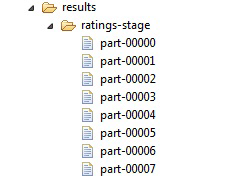
The following partial screen shot shows the results directory that contains the output of the sample application. Eight part files were written since the engine parallelism level was set to eight. Writing files in this manner is optimal, as the individual data streams can be written in parallel. This is recommended for staging data sets because the format is not splittable. Having a single file output limits the parallelism when reading.
Properties
The WriteStagingDataset operator supports the following properties.
Name | Type | Description |
|---|---|---|
blockSize | int | Sets the block size, in rows, used for encoding data. Default: 64 rows. This setting is of most importance when using the COLUMNAR storage format. |
format | DataStorageFormat | The data set format used to store data. By default, this is set to COMPACT_ROW. |
formatOptions | The formatting options used by the reader. This sets all format options at once. | |
mode | Determines how the writer should handle an existing target. | |
selectedFields | List<String> | The list of input fields to include in the output. Use this to limit the fields written to the output. |
target | ByteSource, Path, or String | Source of the input data to parse as delimited text. |
target | ByteSink, Path, or String | The sink to write. Path and String parameters are converted to sinks. If the writer is parallelized, this is interpreted as a directory in which each partition will write a fragment of the entire input stream. Otherwise, it is interpreted as the file to write. |
writeBuffer | int | The size of the I/O buffer, in bytes, to use for writes. Default: 64K. |
writeSingleSink | boolean | Whether the writer should produce a single output file or multiple ones. By default, an output file will be produced for each partition if the target sink supports this. |
writeOnClient | boolean | Determines whether writes are performed by the local client or in the cluster. This option also disables the parallelism during the write, producing a merge of the data on the local client. By default, writes are performed in the cluster if executed in a distributed context. |
Ports
The WriteStagingDataset operator provides a single input port.
Name | Type | Get method | Description |
input | getInput() | The input data to be written to the provided sink in staging data format. |
WriteARFF Operator
The WriteARFF operator writes files using the Attribute-Relation File Format (ARFF). ARFF supports both sparse and dense formats. The format to use is specified with the format mode property. The default mode is sparse. When the input data is highly sparse, the sparse mode can save space since it only writes non-zero values. However, if the data is not very sparse, using sparse mode can actually cause the resultant file to be larger. Use dense mode for dense data.
Note that when writing sparse data that contains enumerated types, the zero ordinal category will always be treated as sparse and so will not appear in the output file. This is normal and expected behavior. The enumerated type is captured in the metadata. When the file is read, the zero ordinal values will be restored as expected.
ARFF provides a metadata section at the start of the file. The metadata may contain several items:
• Comments: free-form, user-supplied comments.
• Relation name: a user name given to the relation contained within the ARFF file.
• Attribute definitions: defines the field name and type of each data field. The attribute definitions define the schema of the file. The definitions are generated by the operator.
ARFF is useful when the input data is sparse. Since ARFF includes metadata such as the file schema, it is also very useful and convenient to use. The dense format is a simple CSV format and as such is very similar to the format written by the WriteDelimitedText operator.
ARFF data can be read ReadARFF Operator.
Code Examples
The following example writes an ARFF file in sparse mode.
Using the WriteARFF operator in Java
// Write to an ARFF file in sparse mode
WriteARFF arffWriter = graph.add(new WriteARFF("results/ratings-arff.txt", WriteMode.OVERWRITE));
arffWriter.setFormatMode(ARFFMode.SPARSE);
arffWriter.setRelationName("Movie Ratings");
arffWriter.addComment("This is an ARFF file written using DataFlow");
arffWriter.setWriteSingleSink(true);
WriteARFF arffWriter = graph.add(new WriteARFF("results/ratings-arff.txt", WriteMode.OVERWRITE));
arffWriter.setFormatMode(ARFFMode.SPARSE);
arffWriter.setRelationName("Movie Ratings");
arffWriter.addComment("This is an ARFF file written using DataFlow");
arffWriter.setWriteSingleSink(true);
Notes from the example:
• The ARFF mode is set to sparse. This enables writing the data in sparse format. Any numeric data values equal to zero will not be written to the output, thereby saving space. When the data is sparse, using the sparse format is very efficient.
• The relation name is set. This is optional. The relation name is part of the ARFF metadata. It is used by consumers of ARFF files to distinguish the data set.
• A comment is added. This is also optional. Comments are added at the beginning of the ARFF metadata section. When reading an ARFF file the comments can also be retrieved. There is no practical limit to the number of comment lines that may be added.
• The writeSingleSink property is enabled. This option forces the writing of a single output file. The default is to write multiple files in parallel.
Using the WriteARFF operator in RushScript
dr.writeARFF(data, {
target:'results/ratings-arff.txt',
mode:'OVERWRITE',
formatMode:'SPARSE',
relationName:'Movie Ratings',
comments:'This is an ARFF file written using DataFlow',
writeSingleSink:'true'});
target:'results/ratings-arff.txt',
mode:'OVERWRITE',
formatMode:'SPARSE',
relationName:'Movie Ratings',
comments:'This is an ARFF file written using DataFlow',
writeSingleSink:'true'});
The following is the first few lines of the ARFF file written with the code example. The metadata appears at the top of the file. Metadata statements begin with the "@" character. Comments begin with the "%" character. The data follows after the DATA statement. Data rows in sparse format are wrapped with curly braces. Data values are comma-separated. Each data value begins with the field index followed by the data value.
% This is an ARFF file written using DataFlow
@relation 'Movie Ratings'
@attribute userID integer % int32
@attribute movieID integer % int32
@attribute rating integer % int32
@attribute timestamp string
@data
{0 1,1 1193,2 5,3 978300760}
{0 1,1 661,2 3,3 978302109}
{0 1,1 914,2 3,3 978301968}
{0 1,1 3408,2 4,3 978300275}
{0 1,1 2355,2 5,3 978824291}
{0 1,1 1197,2 3,3 978302268}
{0 1,1 1287,2 5,3 978302039}
{0 1,1 2804,2 5,3 978300719}
{0 1,1 594,2 4,3 978302268}
@relation 'Movie Ratings'
@attribute userID integer % int32
@attribute movieID integer % int32
@attribute rating integer % int32
@attribute timestamp string
@data
{0 1,1 1193,2 5,3 978300760}
{0 1,1 661,2 3,3 978302109}
{0 1,1 914,2 3,3 978301968}
{0 1,1 3408,2 4,3 978300275}
{0 1,1 2355,2 5,3 978824291}
{0 1,1 1197,2 3,3 978302268}
{0 1,1 1287,2 5,3 978302039}
{0 1,1 2804,2 5,3 978300719}
{0 1,1 594,2 4,3 978302268}
Properties
The WriteARFF operator supports the following properties.
Name | Type | Description |
|---|---|---|
charset | Charset | The character set used by the data source. By default ISO-8859-1 is used. |
charsetName | String | The character set used by the data source by name. |
comments | List<String> | List of comments to add to the target file. |
encodeBuffer | int | The size of the buffer, in bytes, used to encode data. By default, this will be automatically derived using the character set and read buffer size. |
encoding | Properties that control character set encoding. | |
errorAction | CodingErrorAction | The error action determines how to handle errors encoding the output data into the configured character set. The default action is to replace the faulty data with a replacement character. |
fieldDelimiter | char | The character to use to delimit a field. The value is limited to either a single or double quote. |
formatMode | The mode with which to write the file. The supported modes are SPARSE and DENSE. | |
recordSeparator | String | The string value to use as the record separator. This string will be output at the end of each record written. The default value is the system dependent record separator. The value is limited to the Windows or UNIX record separators. |
relationName | String | The relation name attribute. In ARFF, the relation name is captured in the metadata with the tag "@attribute". |
replacement | String | Replacement string to use when encoding error policy is replacement. Default: '?' |
mode | Determines how the writer should handle an existing target. | |
target | ByteSink, Path, or String | The sink to write. Path and String parameters are converted to sinks. If the writer is parallelized, this is interpreted as a directory in which each partition will write a fragment of the entire input stream. Otherwise, it is interpreted as the file to write. |
writeBuffer | int | The size of the I/O buffer, in bytes, to use for writes. Default: 64K. |
writeSingleSink | boolean | Whether the writer should produce a single output file or multiple ones. By default, an output file will be produced for each partition if the target sink supports this. |
writeOnClient | boolean | Determines whether writes are performed by the local client or in the cluster. This option also disables the parallelism during the write, producing a merge of the data on the local client. By default, writes are performed in the cluster if executed in a distributed context. |
Ports
The WriteARFF operator provides a single input port.
Name | Type | Get method | Description |
input | getInput() | The input data to be written to the provided sink in ARFF. |
ForceRecordStaging Operator
Using the ForceRecordStaging operator forces the operators on the input and output sides of the operator to execute sequentially, instead of concurrently. In a dataflow graph, consumers and producers run simultaneously, exchanging data as the operators are ready. This permits the graph to exploit pipeline parallelism. The data is staged to disk in configured temporary storage spaces.
In some cases, it may be necessary to avoid this concurrency. The simplest example is:
• Operator A produces data.
• Operator B consumes data from A, producing data only when all data from A has been consumed. (Calculating a total, for instance.)
• Operator C consumes the output of both A and B, but does not consume any data from A until after consuming data from B.
In this case, a memory usage dilemma, known as queue expansion, arises. B needs all of A's data, but C does not read anything from A until B produces some data. As the data unread by C cannot be discarded, it must be saved until it is read. To minimize memory requirements, the lag between readers is limited. This limit is raised when required, but in this case, it requires the entire output of A, which could easily exceed memory.
Usually, this is automatically handled by the framework, saving data to disk. This is done in a optimistic fashion, avoiding disk I/O and associated performance degradation until necessary at the cost of a (small) potential risk of graph failure due to memory being exhausted. This operator provides a pessimistic approach to the problem that forces all data to disk, with all the associated performance costs.
Tip... Use the ForceRecordStaging operator directly in situations where it is known that queue expansion will occur. Direct usage prevents the overhead of handling queue expansion.
Code Example
The code example provides a common use case requiring use of the ForceRecordStaging operator. A data source is aggregated using the Group operator. Aggregation causes a reduction of the input data. The output of Group is then wired into a Join operator. This allows joining the aggregated results back to the original data. However, only a few key groups are known to exist. This implies the join will consume large amounts of the original source while waiting for data from the group. Forcing the data to be staged prevents queue expansion and the overhead of handling the expansion at run time.
Note that the example is not complete: code to produce the source is not provided, and properties are not set on the group and join operators.
Using the ForceRecordStaging operator
// Aggregate the source data
Group group = graph.add(new Group());
graph.connect(source, group.getInput());
// Force staging of source data to prevent queue expansion.
// The group operator reduces the input row count considerably.
ForceRecordStaging forceStaging = graph.add(new ForceRecordStaging());
graph.connect(source, forceStaging.getInput());
// Join the original data to the aggregated results. Use the staged data
// instead of the original source to prevent queue expansion.
Join join = graph.add(new Join());
graph.connect(forceStaging.getOutput(), group.getOutput());
Group group = graph.add(new Group());
graph.connect(source, group.getInput());
// Force staging of source data to prevent queue expansion.
// The group operator reduces the input row count considerably.
ForceRecordStaging forceStaging = graph.add(new ForceRecordStaging());
graph.connect(source, forceStaging.getInput());
// Join the original data to the aggregated results. Use the staged data
// instead of the original source to prevent queue expansion.
Join join = graph.add(new Join());
graph.connect(forceStaging.getOutput(), group.getOutput());
Using the ForceRecordStaging operator in RushScript
// Force a dataset to be staged
var stagedData = dr.forceRecordStaging(data);
var stagedData = dr.forceRecordStaging(data);
Properties
The ForceRecordStaging operator has no properties.
Ports
The ForceRecordStaging operator provides a single input port.
Name | Type | Get Method | Description |
input | getInput() | The input data. |
The ForceRecordStaging operator provides a single output port.
Name | Type | Get Method | Description |
output | getOutput() | Output data of the operator. The input data is replicated to this port after first staging to disk. |
WriteORC Operator
The WriteORC operator writes data file in Apache Optimized Row Columnar (ORC) format. The ORC format is supported by Apache Hive.
The operator is registered as writeORC for using as JSON or scripting. This operator is based on AbstractWriter operator and supports the features from the base class, particularly in parallel writing. Each par file created in this way is a logical ORC file. Similar to ReadORC operator, the WriteORC operator can access Hive libraries using the shim layer. The operator uses the ORCFile or Writer API.
Note: The operator requires a Hadoop module configuration to be enabled even if the workflow does not run on the cluster or access HDFS.
For yarn jobs, the configuration property job.master.resources.memory must be set to a minimum of 256 MB. The default value is 64 MB. It is available under Container Configuration in the Cluster Administration portal.
For yarn jobs, the configuration property job.master.resources.memory must be set to a minimum of 256 MB. The default value is 64 MB. It is available under Container Configuration in the Cluster Administration portal.
For more information about ORC format, go to the ORC file format manual.
A few DataFlow data types such as CHAR and TIME are not supported for writing because these do not have a matching ORC type. If a schema containing the unsupported data types is found, then the WriteORC operator will throw an exception at the time of compiling a graph.
In general, DataFlow types are assigned to the ORC schema types as mentioned in the following table.
DataFlow Type | ORC Schema Type |
BOOLEAN | BOOLEAN |
LONG | BIGINT |
BINARY | BINARY |
DATE | DATE |
NUMERIC | DECIMAL |
DOUBLE | DOUBLE |
FLOAT | FLOAT |
INT | INT |
STRING | STRING |
TIMESTAMP | TIMESTAMP |
Properties
The WriteORC operator provides the following properties that is derived directly from WriterOptions of the ORC.
Properties | Type | Description |
|---|---|---|
blockPadding | boolean | Sets whether the HDFS blocks are padded to prevent stripes from straddling blocks. |
bufferSize | int | The size of the memory buffers used for compressing and storing the stripe in memory. |
compression | ORCCompression (mapping to CompressionKind) | Sets the generic compression that is used to compress the data. Lempel–Ziv–Oberhumer (LZO) data compression is not supported. This is excluded from the ORCCompression enum. |
rowIndexStride | int | Sets the distance between entries in the row index. This value must be 0 (no index) or greater than or equal to 1000. |
stripeSize | long | Sets the stripe size for the file. |
version | ORCVersion (mapping to Version) | Sets the version of the file that will be written. |
formatOptions | Formatting options used by the reader. This property sets all the format options at once. | |
mode | Defines the way for the writer to handle an existing target. Appending to an existing file is not supported. If you specify APPEND option as the mode property value, then it throws an exception while compiling. | |
saveMetadata | boolean | Specifies whether or not the writer should save metadata information about the ordering and distribution of data. Default value is false. |
target | ByteSink, Path, or String | Defines the sink to write. The Path and String parameters are converted to sinks. If the writer is parallelized, then this is interpreted as a directory in which each partition writes a fragment of the entire input stream. Else, it is interpreted as the file to write. |
writeBuffer | int | Specifies the size of I/O buffer (in bytes) to use for write operation. Default: 64000. |
writeSingleSink | boolean | Specifies whether the writer should produce a single or multiple output files. By default, an output file is created for each partition only if the target sink supports. |
writeOnClient | boolean | Defines whether or not the write operation is performed by the local client or in the cluster. This option also disables the parallelism during the write and merges the data on the local client. By default, the write operation is performed in the cluster if executed in a distributed context. |
Note: Before running the workflow, ensure that the client configuration and the jar files are added to the classpath. For more information, see Integrating DataFlow with Hadoop.
Code Examples
The following example provides writing the ORC file data using Java.
Using the WriteORC operator in Java
WriteORC writer = graph.add(new WriteORC("hdfs://localhost:9000/dforc.orc"));
writer.setMode(WriteMode.OVERWRITE);
writer.setCompression(ORCCompression.SNAPPY);
writer.setBlockPadding(true);
writer.setMode(WriteMode.OVERWRITE);
writer.setCompression(ORCCompression.SNAPPY);
writer.setBlockPadding(true);
The following example provides writing the ORC file data using RushScript.
Using the WriteORC operator in RushScript
var writer = dr.writeORC("orc-out", source, {target:"file:///data/dforc.orc", writeSingleSink:true});
Port
The WriteORC operator provides a single input port.
Name | Type | Get Method | Description |
Input | getInput() | Input data that should be written to the provided sink in delimited text format. |
Last modified date: 03/10/2025