Warehouse Details
Clicking the warehouse name in the list of warehouses displays details about the warehouse on the Warehouse Details page.

The following are the fields and controls on the Warehouse Details page:
| Field | Description |
|---|---|
| Status | Status of the warehouse: • Creating, Create Failed, Create Error Analysis • Starting, Start Failed • Running • Scaling, Scaling Failed • Stopping, Stopped, Stop Failed • Deleting, Deleted, Delete Failed • Unknown |
| Compute | Number of Actian units (AUs) in the warehouse.Azure: You can scale the size of Azure warehouses; for more information, see Scale a Warehouse.] |
| Region | Geographical location of the warehouse |
| Warehouse ID | Unique ID of the created warehouse. If you encounter a problem, Actian Support will need this ID. |
| Warehouse Version | The version number of the warehouse in the format major.minor.patch. For more information about features in a particular warehouse version, see What’s New in Avalanche. |
| IP Allow List | Displays the Allow List IP addresses for warehouse access. Clicking the Show IP Labels toggle shows or hides text labels for the listed IP addresses: To add or remove IP addresses, see Update Allow List IP Addresses. To add or remove IP addresses, see Update Allow List IP Addresses. |
| Idle Stop | Amount of time set before the warehouse is set to the stopped state after no database (query) activity. This time period was set at warehouse creation. Idle stop cannot be disabled in a non-production environment.For more information, see Automatic Stopping of Idle Warehouses.Note: Idle stop is currently not available for Google Cloud warehouses. |
| External Table Access | Lets you set storage account authentication by entering environment credentials. For more information, see Grant Access to Warehouse for External Tables Access. |
| Created By | Date and time of warehouse creation |
| Last Modified By | Date and time warehouse was last modified |
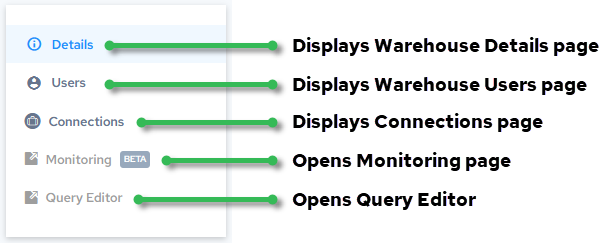
More information:
- Users page – Display Users from the Warehouse Details Page
-
Connections page – Access Warehouse Connection Information
-
Monitoring page – Monitor Warehouses (currently not available for Google Cloud warehouses)
- Query Editor page – Query Editor