User-defined Metrics
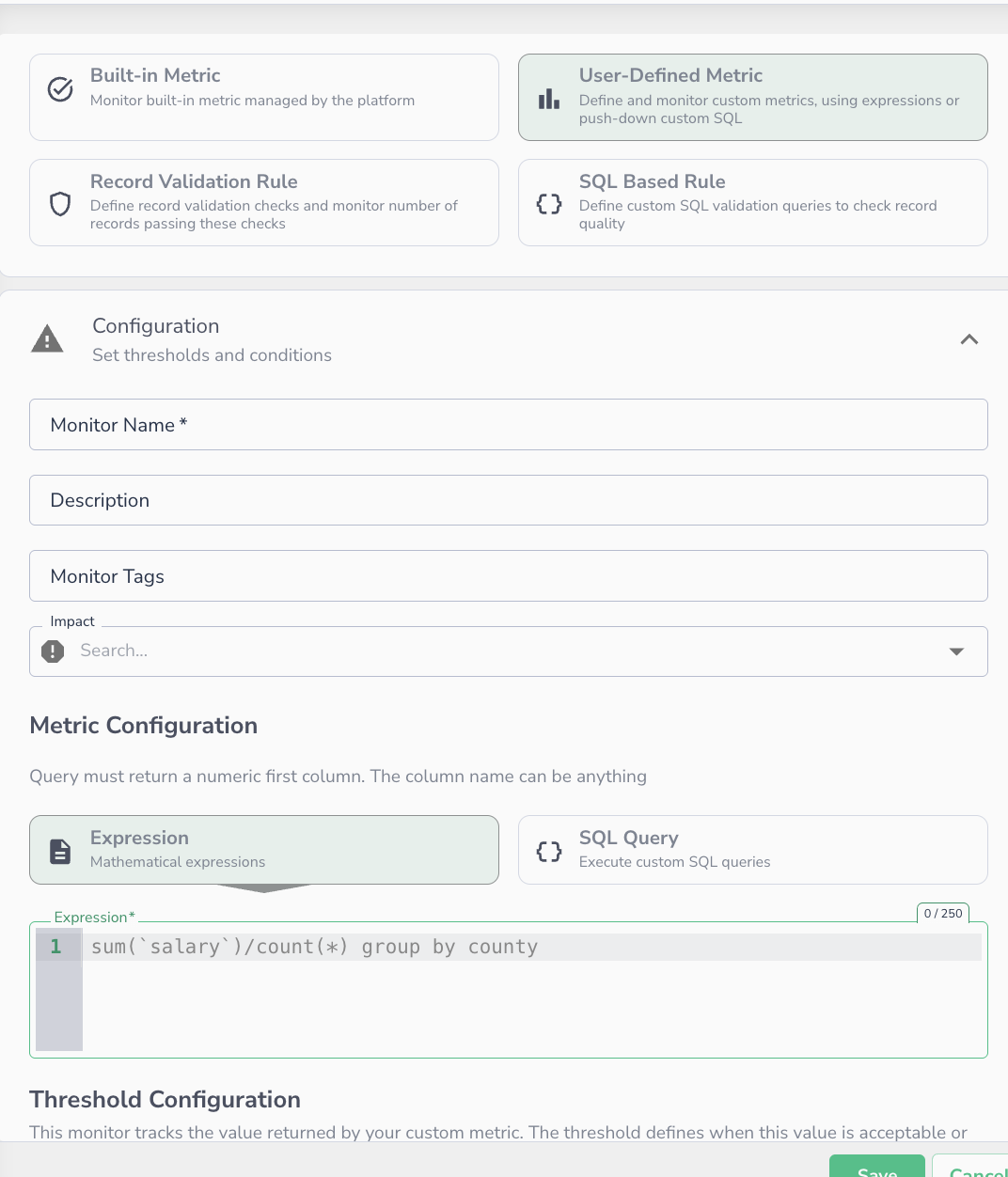 Creating a user-defined metric monitor — select the metric type, write an expression or SQL query, then configure thresholds.
Users can define custom metrics to monitor specific data quality concerns and receive alerts when thresholds are violated. Each monitored metric is validated against its corresponding monitor, which defines thresholds, scope, notification settings, and alerting rules. When a metric violates the defined policy, an alert is automatically generated.
Data Observability provides two methods for defining custom metrics:
- Metric Expressions - Simple aggregations with grouping
- Raw SQL Queries - Complex queries with full SQL capabilities
Metric Expressions
Metric expressions enable you to specify simple aggregations and groupings using a straightforward syntax.
Syntax Rules
- Attribute names must be wrapped in backticks:
`attribute_name` - Maximum of 4 dimensions in
group byclauses - Supports standard aggregation functions
Available Aggregations
in
max
count
avg
sum
distinct
variance
median
stddev
Examples
Simple aggregation:
Aggregation with grouping:
Average by multiple dimensions:
Raw SQL Queries
For more complex monitoring scenarios, you can write custom SQL queries that return a single metric value along with optional dimensions.
Requirements
- First column: Must return a numeric value (this is the tracked metric)
- Subsequent columns: Used as dimensions for grouping and filtering
- The query runs against the specified data connector
- Not limited to a single table - you can join multiple tables
Supported Data Connectors
Raw SQL queries are available for the following connectors:
- BigQuery
- Amazon Athena
- Databricks
- Trino
- Snowflake
- Amazon Redshift
Syntax Rules
- Table names must be wrapped in backticks:
`table_name` - Use valid SQL syntax for your specific connector
- Ensure the first selected column returns a numeric value
- Additional columns become dimensions for the metric
Examples
Basic query with dimension:
- Tracked metric:
emp_salary - Dimension:
emp_region
Query with multiple dimensions:
SELECT AVG(order_value), customer_region, product_category
FROM `orders`
WHERE order_date >= CURRENT_DATE - 30
GROUP BY customer_region, product_category
- Tracked metric:
AVG(order_value) - Dimensions:
customer_region,product_category
Complex query with joins:
SELECT COUNT(*), o.region, c.customer_tier
FROM `orders` o
JOIN `customers` c ON o.customer_id = c.id
WHERE o.status = 'failed'
GROUP BY o.region, c.customer_tier
- Tracked metric:
COUNT(*) - Dimensions:
region,customer_tier
Best Practices
Choosing Between Expressions and SQL
Use Metric Expressions when:
- You need simple aggregations on a single table
- Your logic fits within 4 dimensions
- You want a quick, straightforward configuration
Use Raw SQL when:
- You need complex joins across multiple tables
- Your logic requires advanced SQL features (CTEs, window functions, etc.)
- You need fine-grained control over the query
- You're working with connector-specific SQL dialects
Performance Considerations
- Keep queries efficient to avoid impacting your data warehouse
- Use appropriate filters to limit data scanned
- Consider query execution time when setting monitoring frequency
- Test queries directly in your data warehouse before adding them as monitors
Troubleshooting
Common Issues
Metric expression fails:
- Verify attribute names are wrapped in backticks
- Check that you're not exceeding 4 dimensions in
GROUP BY - Ensure aggregation function is supported
SQL query returns no data:
- Verify table names are correct and wrapped in backticks
- Check that your filter conditions return results
- Confirm you have permissions to query the tables
First column is not numeric:
- Ensure your first
SELECTcolumn returns a number - Use
CAST()orCONVERT()if needed to ensure numeric type - Aggregations like
COUNT(),SUM(),AVG()automatically return numeric values
Query timeout:
- Optimize your query to reduce execution time
- Add more restrictive
WHEREclauses - Consider pre-aggregating data in your warehouse